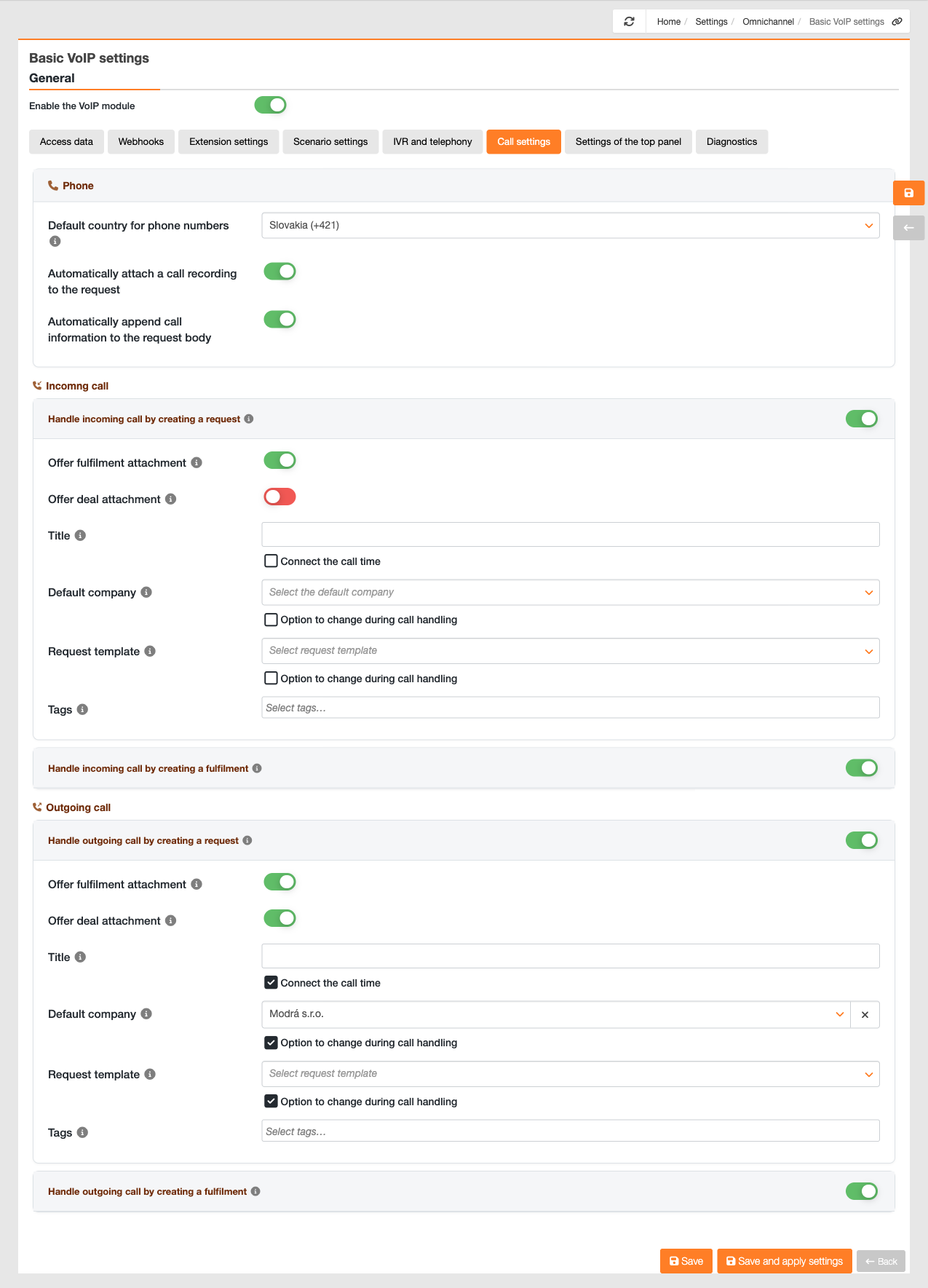
This tab contains settings for the telephone and for handling incoming and outgoing calls.
Default country code – applies to numbers that do not have an international dialling code.
Attach recording file to request – once available, the call recording will be attached to the request as an attachment.
Attach call details to the request – call details will be attached to the request.
For outbound calls, the same options are available as when answering a call from the queue – Handle an outbound call by creating a request, offering fulfilments and deals, A name with the option to include the call duration, a default company, a request template, tags, and ‘Resolve an outgoing call by creating a fulfilment’. Their functions are the same, but they apply to calls that the operator dials themselves.
The same set of options is available for incoming calls – ‘Handle an incoming call by creating a request’ along with ‘Offer a service’, ‘Name’, ‘Default Company’, ‘Template’ and ‘Tags’. These settings are global and will always be applied when a call has no assigned queue: in the ‘Configuration’ scenario in Zadarma for all incoming calls, and in the ‘Configuration’ scenario in CDESK only for calls to which a queue could not be assigned.
Image: The ‘Call Settings’ tab, showing the handling of both incoming and outgoing calls
Was this page helpful?
Thank you for your feedback.
Manage your cookie settings
To provide the best possible experience, we use technologies such as cookies to store and/or access information about your device. Consent to these technologies allows us to process data such as browsing behavior or unique identifiers on this site. Refusal or withdrawal of consent may adversely affect certain features and functions.
Functional cookies
Always active
Technical storage or access is strictly necessary for the legitimate purpose of enabling the use of a specific service explicitly requested by the subscriber or user, or for the sole purpose of transmitting a communication over an electronic communications network.
Preferences
Technical storage or access is necessary for the legitimate purpose of storing preferences that the subscriber or user has not requested.
Statistical cookies
A technical storage facility or access used exclusively for statistical purposes.Technical storage or access used exclusively for anonymous statistical purposes. Without a subpoena, voluntary cooperation from your Internet service provider, or additional records from a third party, information stored or retrieved for this purpose alone cannot usually be used to identify you.
Marketing cookies
Technical storage or access is required to create user profiles for the purpose of serving ads or tracking users on a website or across multiple websites for similar marketing purposes.