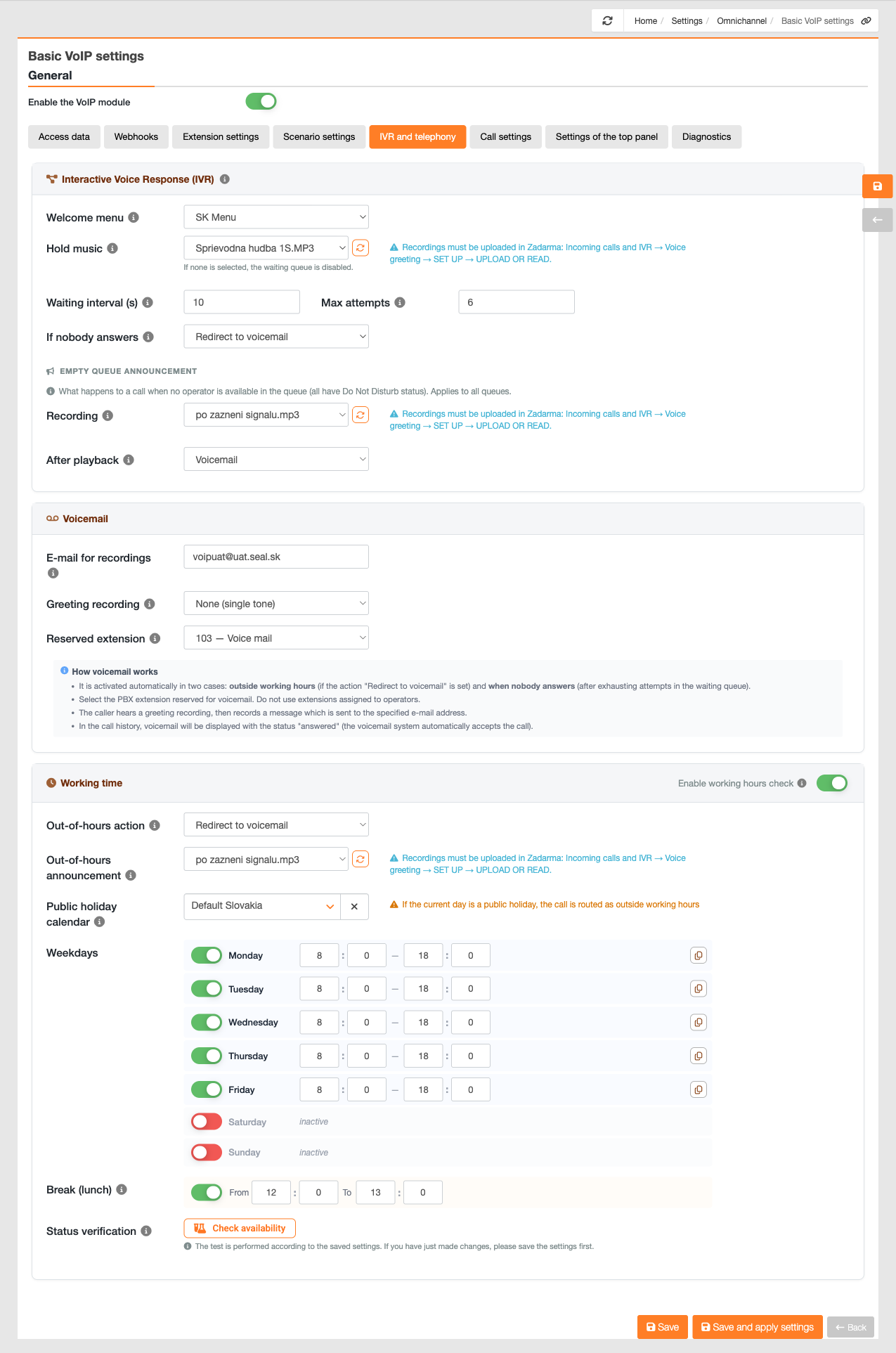
Whilst you configure individual queues and options in the scenario settings, this tab contains settings that apply to telephony as a whole. This tab is only available in the Configuration in CDESK scenario; it is not displayed in the ‘Configuration’ scenario in Zadarma, as these settings are then managed via the Zadarma portal.
The first section is the automated voice system. The welcome menu determines which menu is played first when an incoming call is received – the caller selects a key based on this.
The second part is the caller’s hold music when all operators are busy:
- On-hold music – the recording the caller hears whilst waiting for a connection.
- Waiting interval – the number of seconds a single cycle of music playback lasts before another attempt is made to establish a connection.
- Maximum attempts – the number of times CDESK will attempt to link the call.
- If no one answers – action after all attempts have been exhausted – Forward to an available extension, Forward to voicemail or Hang up.
- Alert for an empty queue – a recording for situations where no one is available in the queue, and the action to be taken after it has been played.
The third section is the voicemail. Here, you can set the email address to which recorded messages will be sent, the welcome message that callers hear before recording (none, the standard one from Zadarma, or a custom one), and the dedicated extension, i.e. the switchboard extension designated for the voicemail service. Do not use extensions associated with operators for this purpose.
Voicemail is activated automatically in two situations – outside working time, if call forwarding to voicemail is set up, and when no one answers after all attempts in the queue have been exhausted. The caller hears a welcome message, then leaves a message which is sent to the specified email address.
The final section is working time:
- Enable working time checking – a toggle switch in the header of the Working Time section. If it is disabled, CDESK does not track working hours and the other fields in this section are not displayed at all – they only appear once it is enabled. When it is enabled, calls outside working hours are handled according to the configured action.
- Action outside working time – what happens to a call that is received outside working time – for example, play an alert and hang up, or forward to voicemail, which must first be configured.
- Out-of-hours alert – the recording that the caller hears in such cases, for example, asking them to call during working time.
- Public holiday calendar – select the calendar used to determine holidays (Slovakia by default). If the current date is a holiday, the call is routed in the same way as outside working time.
- Working days – each day of the week has its own custom toggle switch and a from–to time range. A disabled day is selected as inactive, and calls on that date are handled as if they were outside working time – typically, Saturday and Sunday are disabled in this way. Use the copy icon at the end of the row to apply the times for that date to all other dates.
- Break (lunch) – a separate toggle with a start-to-end time. If enabled, calls received during the break are handled in the same way as calls outside working time.
- Check availability – a button that tests the current state. The test uses the saved settings, so please save any changes first.
The setting for the ‘empty line’ alert applies centrally to all queues, so you do not need to set it for each queue individually. Once saved, the voicemail configuration is automatically carried over to the switchboard, so Zadarma can run the voicemail alert even outside working hours.