This page follows on from the Service Report Connector Settings page and describes only what the connector requires in order for the protocol to be generated directly from the service record in CI.
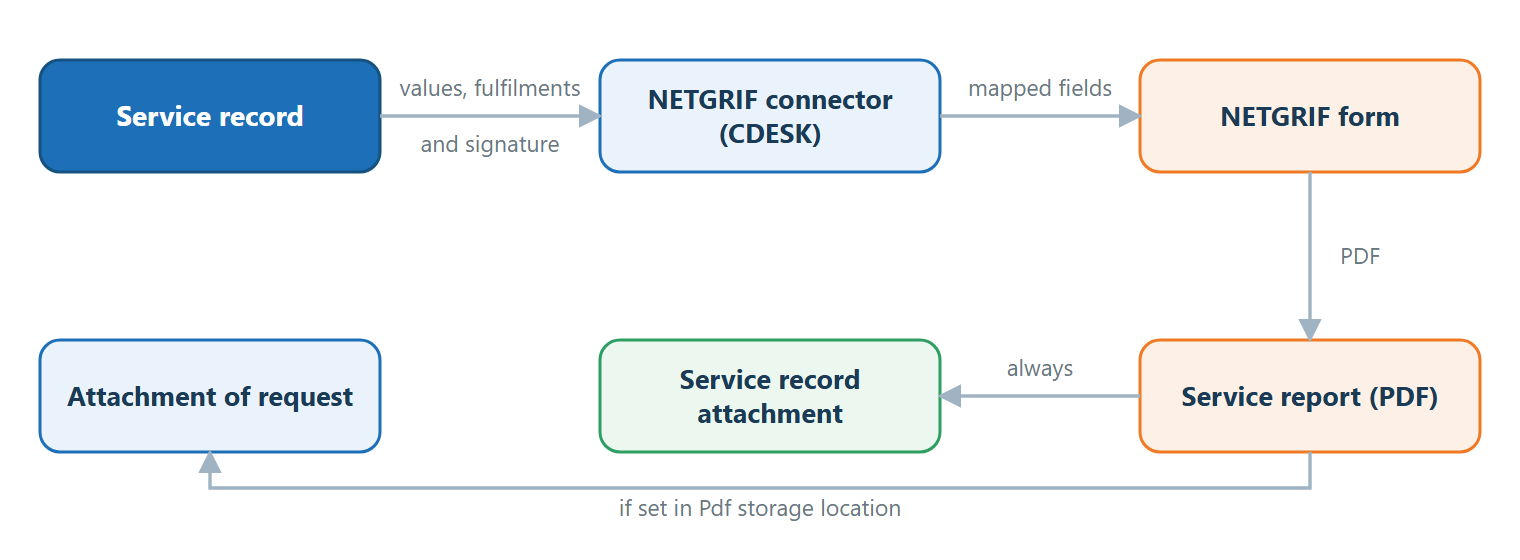
The service protocol is a PDF document generated via the NETGRIF connector based on a form prepared in the NETGRIF system and the pairing of its fields with data in CDESK. In order for the protocol to be generated directly from the service record, the connector must use data from the service record and attach the resulting PDF to it. Connectors are managed in the Global Settings → Connectors, API menu. This page describes only the fields relevant to service records.
Figure: The principle of generating a service protocol via the NETGRIF connector
Connector fields for service records
The Generate Protocol button will only be viewed in the service record if there is at least one active NETGRIF connector that meets all the conditions in the following list. If the button does not appear, you should first check these fields.
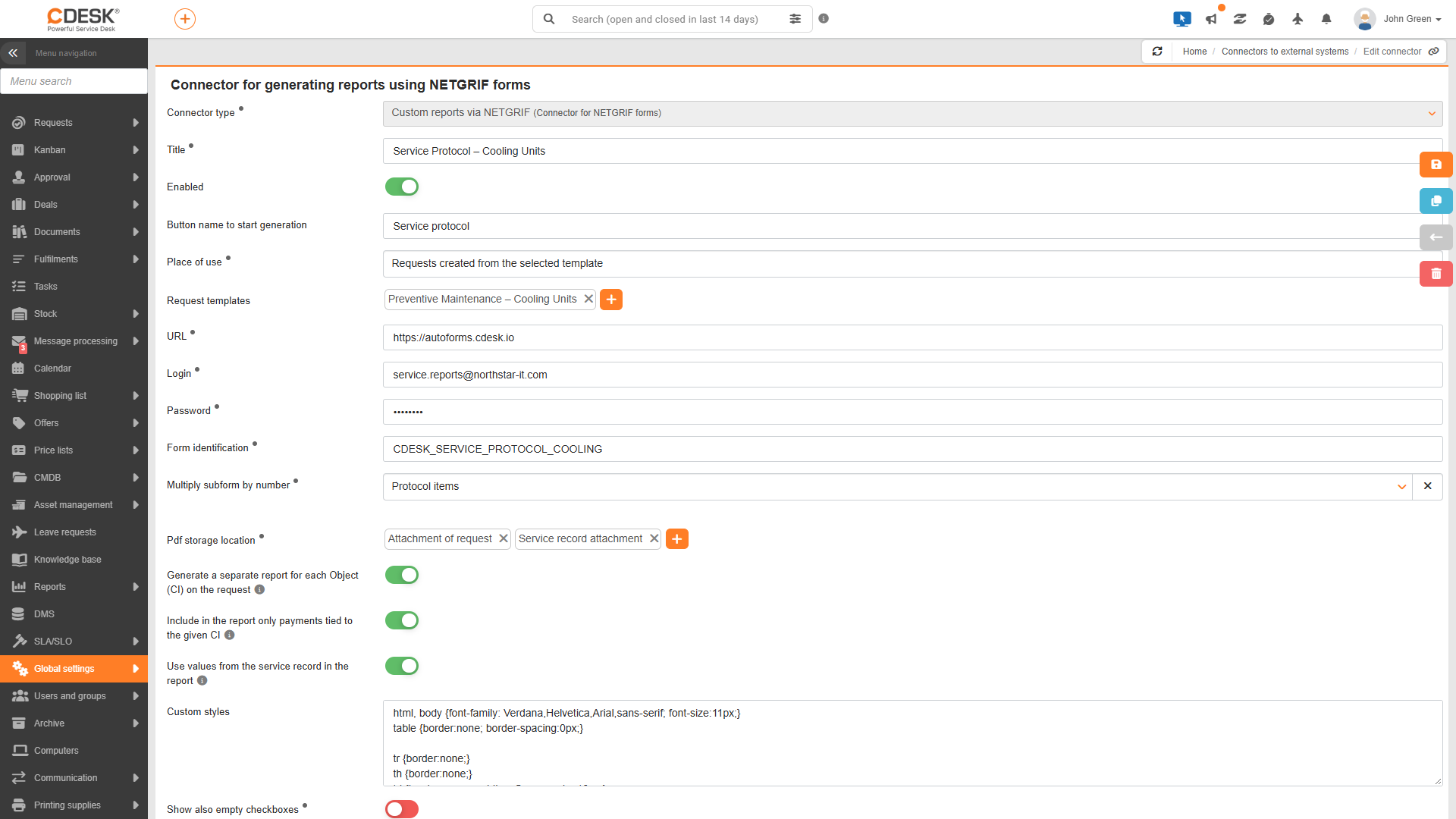
Usage location – Must be Requests or Requests created from a selected template.
PDF storage location – Must include the Service Record Attachment option. The generated PDF will then be attached to the service record for the relevant CI. By default, it also includes Request Attachment so that the protocol is saved in the request attachments as well.
Generate a separate report for each CI object on the request – Must be enabled to create a separate report for each device. For example, when servicing five air-conditioning units in a single request, five protocols will be generated. This field is displayed only if the PDF storage location contains the Request Attachments folder.
Include only fulfilments related to the specific CI in the report – Must be enabled so that the report contains only work carried out on the specific unit. This field appears once the previous field has been enabled.
Apply values from the service record in the report – Must be enabled. The report will then draw the device values from the service record (status on the day of the service), rather than the current values on the CI. The fulfilments in the protocol will be limited to those included in the service record, and client signature details can be applied during field pairing.
Figure: NETGRIF connector settings – Place of use: Requests created from the selected request template, PDF save location with the options ‘Attachment to Request’ and ‘Attachment to Service Record’, and three enabled boxes for service records
The customer’s signature on the protocol
When the Apply values from service record for report box is enabled, three pieces of signature information can be applied when pairing form fields. Based on these, the report will display the client’s signature, the name of the signatory and the time of signing.
Service record -> Client’s signature – signature – Image of signature. For an unsigned record, the signature line remains blank.
Service Record -> Customer Signature – Name of the signatory – The name of the contact on whose behalf the record was signed. This field remains blank for unsigned records.
Service record -> Client signature – date and time – Date and time of signature in the format DD.MM.YYYY HH:MM. For an unsigned record, this field remains blank.
Was this page helpful?
Thank you for your feedback.
Manage your cookie settings
To provide the best possible experience, we use technologies such as cookies to store and/or access information about your device. Consent to these technologies allows us to process data such as browsing behavior or unique identifiers on this site. Refusal or withdrawal of consent may adversely affect certain features and functions.
Functional cookies
Always active
Technical storage or access is strictly necessary for the legitimate purpose of enabling the use of a specific service explicitly requested by the subscriber or user, or for the sole purpose of transmitting a communication over an electronic communications network.
Preferences
Technical storage or access is necessary for the legitimate purpose of storing preferences that the subscriber or user has not requested.
Statistical cookies
A technical storage facility or access used exclusively for statistical purposes.Technical storage or access used exclusively for anonymous statistical purposes. Without a subpoena, voluntary cooperation from your Internet service provider, or additional records from a third party, information stored or retrieved for this purpose alone cannot usually be used to identify you.
Marketing cookies
Technical storage or access is required to create user profiles for the purpose of serving ads or tracking users on a website or across multiple websites for similar marketing purposes.