
Enabling service records on the CI model
Last updated
Service records are enabled separately for each CI type. The aim is to ensure that they are only created for equipment where it makes sense to monitor the service status – for example, refrigeration units or compressors – and not for software licences. These settings can be found in the CI type settings on the General Information tab. CI types can be found in the item group details on the Item Types tab (the names in the CMDB menu may vary depending on the CMDB settings).
- In the CMDB → Item Groups menu, open the group to which the CI type belongs.
- On the Item Types tab, open the CI type for which you wish to enable service records.
- On the General Information tab, enable the Service Records switch. Two additional fields will be viewed.
- In the Enable service record generation – Request type field, select the request types for which service records are to be created, for example, a type intended for servicing.
- Alternatively, in the Enable Service Record Generation – Request Template field, select the request templates from which service requests are created.
- Save the settings by clicking the Save button.
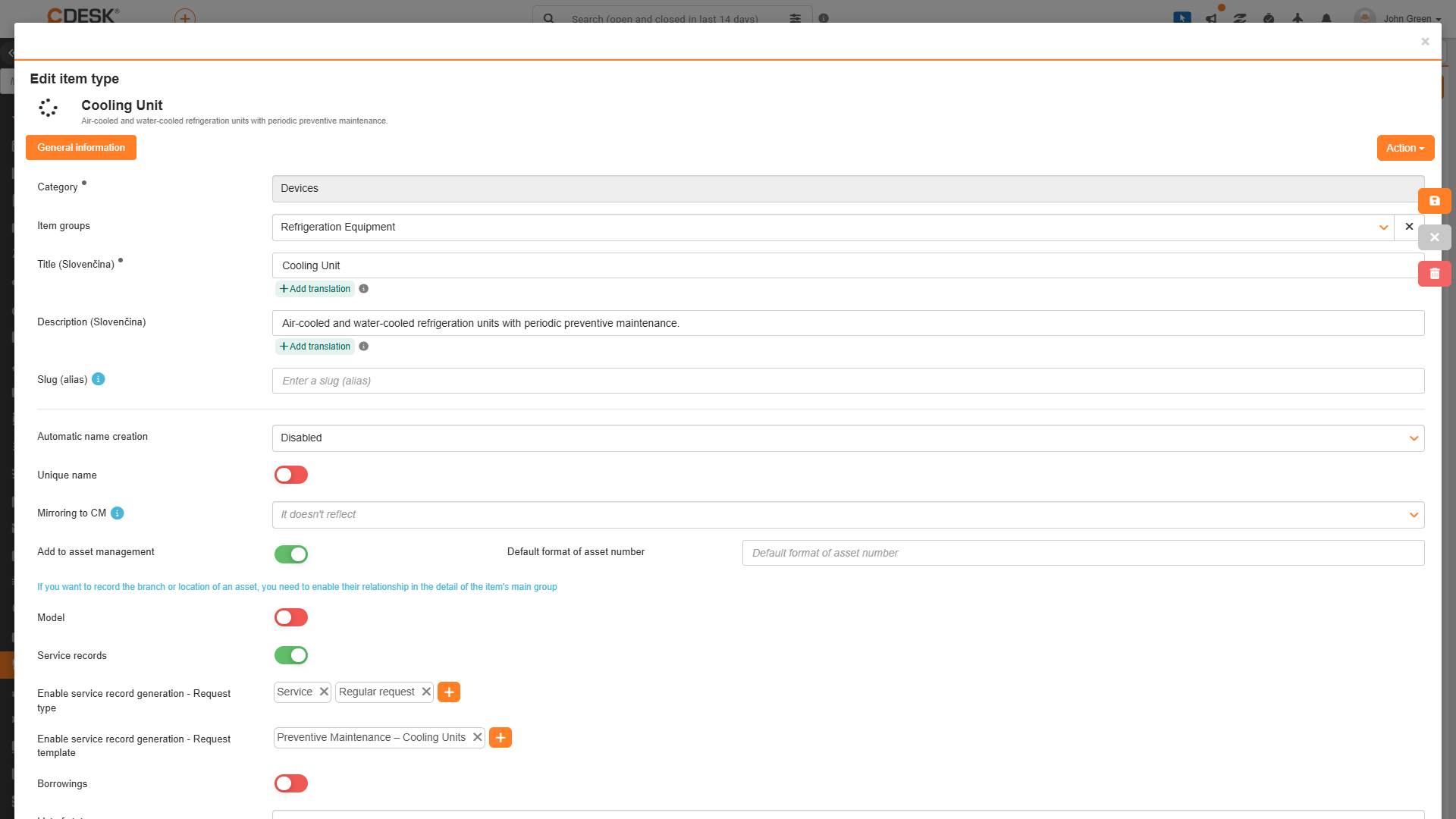
Meaning of the individual fields:
- Service Records – Enables service records for all CIs of the specified type. The Service Records tab will be viewed on these CIs, and the original Records tab will be renamed Service History. When disabled, the tab is hidden and the original name is restored. Existing service records are not deleted when this option is disabled.
- Enable service record generation – Request type – Types of requests for which a service record may be created. Multiple types may be selected.
- Enable service record generation – Request template – Request templates for which a service record may be created. Multiple templates may be selected.
The following rules apply when evaluating types and templates:
- It is sufficient to meet just one of the conditions. A service record may be created for a request that is of one of the selected types, or that was created from one of the selected request templates.
- If no type or request template is selected, no service records are created at all, either automatically or manually. The Service Records tab will be viewed in CI, but there will be no requests listed in its menu.
The same explanation is also displayed in the tooltip for both fields: “A service record can be created – either automatically when saving a CI or manually using the button – only for requests that have one of the selected types or one of the selected request templates. If nothing is selected, service records are not created.”
Was this page helpful?
Thank you for your feedback.