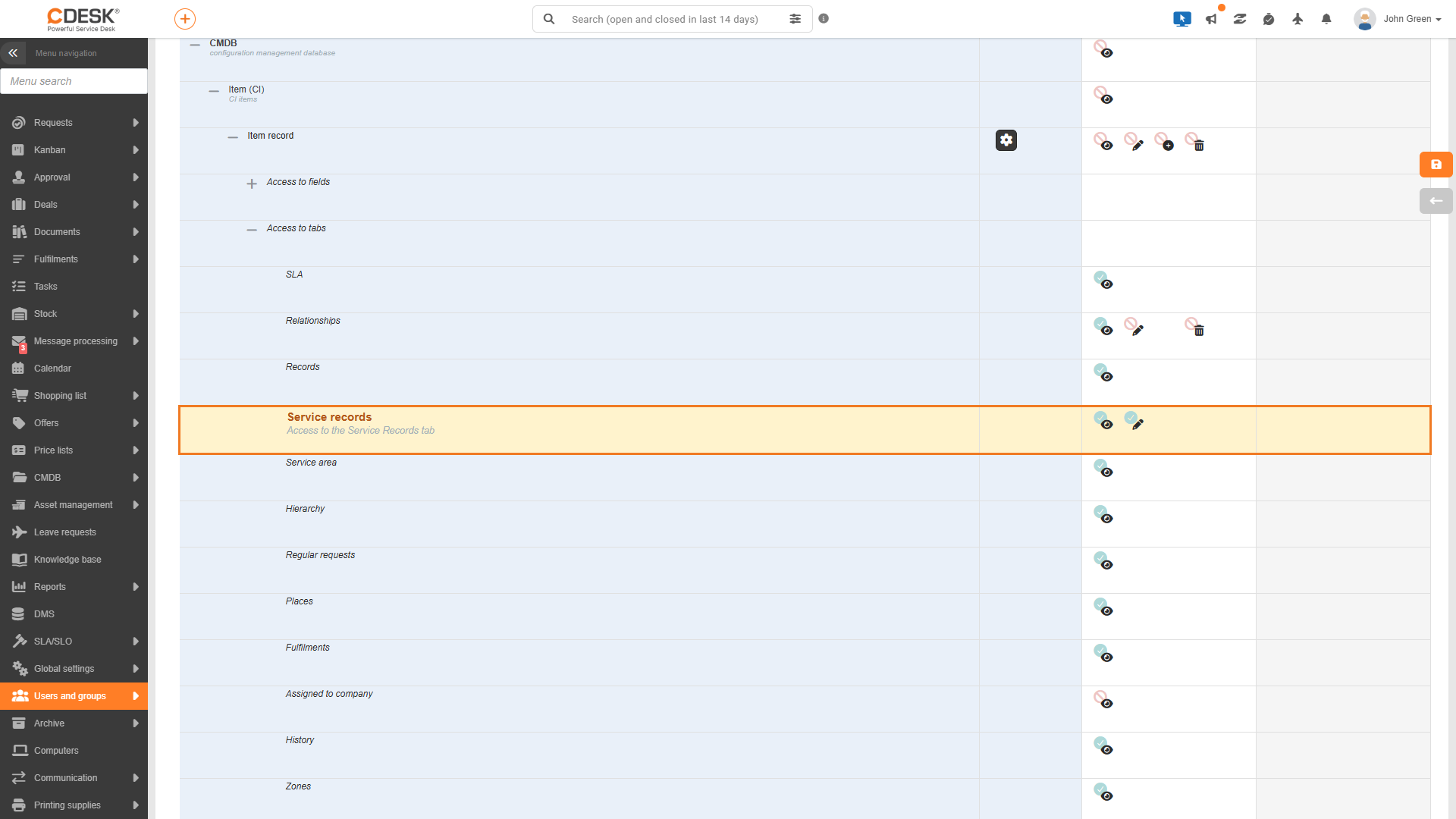
Permissions determine who can view service records and who can work with them. In the group permissions tree, service records have their own object amongst the permissions for the individual tabs in the CI details. It is located under CMDB → Object (CI item) → Object record → Tab access → Service records, and its description is ‘Access to the Service records tab’.
The entry has two levels of authorization. Put simply, ‘Access’ means ‘I can view service records’ and ‘Write’ means ‘I can work with them’.
Authorization
What this allows the user to do
Enabled by default for system groups
Access
View the Service Records tab on the CI, browse the list and view record details, open and download protocols, and copy the link to a record. Without this permission, the tab will not be displayed, even if service records are enabled for that CI type.
Work with records: create and update them manually, sign them, add and remove fulfilments, generate and delete protocols, archive records and delete archived records.
Administrators, Operators, Assignees
Figure: Permissions tree for the ‘Assignees’ group – the ‘Service Records’ item highlighted, with access and write permissions granted
When it comes to permissions, it is also important to be aware of the following:
By default, the entire CMDB module is disabled for customer accounts. Consequently, they do not normally see the Service Records tab, even though they have been granted access to it.
Service records are only available for CIs to which the user has access. When selecting a request, only those requests that the user can see are displayed.
Fulfilments in the timesheet are viewed according to task permissions, and issued materials according to issue notes. The user may therefore not see all the fulfilments stored in the record.
Sending the protocol to the customer also requires permission for the customer discussion thread for the request, i.e. both access to and the ability to create posts.
The automatic creation of a record does not depend on the ‘Entry’ permission. A record is created when a change is saved to the CI, regardless of which user saves the change.
Was this page helpful?
Thank you for your feedback.
Manage your cookie settings
To provide the best possible experience, we use technologies such as cookies to store and/or access information about your device. Consent to these technologies allows us to process data such as browsing behavior or unique identifiers on this site. Refusal or withdrawal of consent may adversely affect certain features and functions.
Functional cookies
Always active
Technical storage or access is strictly necessary for the legitimate purpose of enabling the use of a specific service explicitly requested by the subscriber or user, or for the sole purpose of transmitting a communication over an electronic communications network.
Preferences
Technical storage or access is necessary for the legitimate purpose of storing preferences that the subscriber or user has not requested.
Statistical cookies
A technical storage facility or access used exclusively for statistical purposes.Technical storage or access used exclusively for anonymous statistical purposes. Without a subpoena, voluntary cooperation from your Internet service provider, or additional records from a third party, information stored or retrieved for this purpose alone cannot usually be used to identify you.
Marketing cookies
Technical storage or access is required to create user profiles for the purpose of serving ads or tracking users on a website or across multiple websites for similar marketing purposes.