
General overview
Last updated
The Device Repair module in CDESK is used to keep a list of device repairs carried out at clients’ premises. It covers the entire service process: the service request, including the equipment to be serviced; a record of the work carried out, materials used and measurements taken on the equipment; the client’s signature; and a service protocol in PDF format, which the client receives via the request discussion forum.
Three roles are involved in the service process. The administrator sets up the settings: device types, the service protocol connector and permissions. The coordinator or technician works in the CDESK web interface. The field technician works in the CDESK Pro mobile app directly at the device. Everyone works with the same requests, devices and fulfilments, so data entered on the phone app is immediately available on the web and vice versa.
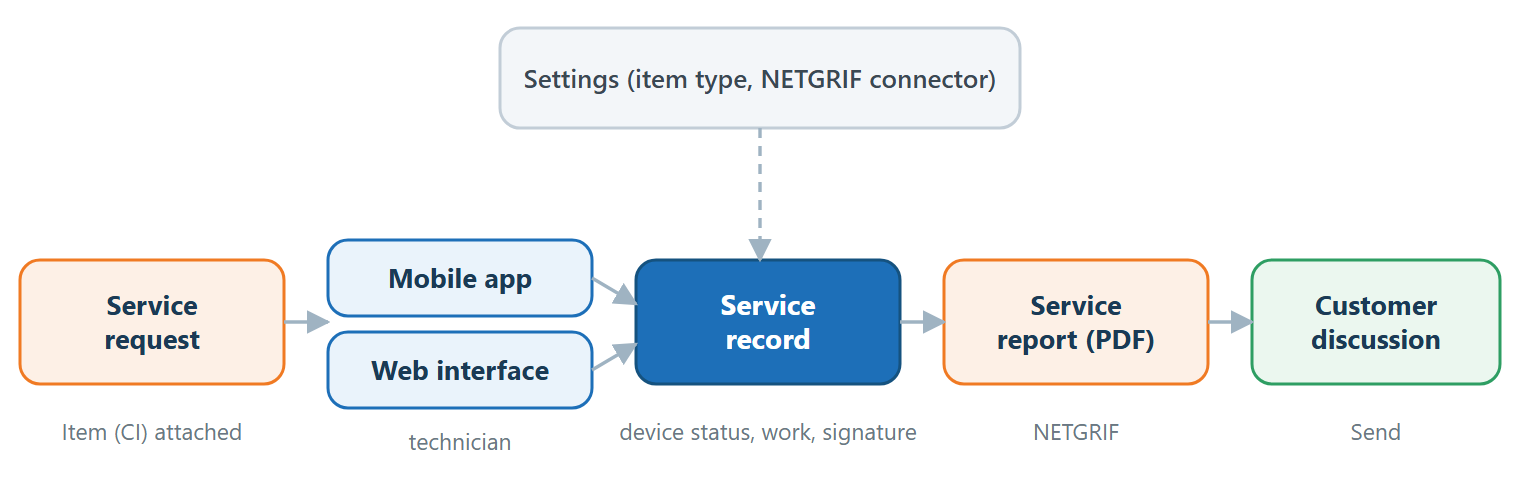
What the device repair service offers
Device repair brings together several fields of CDESK. The following overview sets out what can be done with them. The individual fields are described in detail in the following chapters.
- Service requests relating to equipment. One or more pieces of equipment (CI) on which the service is to be carried out can be attached to a request, and the technician can view them both on the web and on their phone.
- Service protocols based on a custom template. The protocol is generated from a form designed in NETGRIF, so it can match the paper protocol that the client has been using to date. Different protocols can be used for different devices or tasks.
- Report generation from various places. A report can be generated from a request, from a Fulfilment, from a service record on a CI, or via the mobile app; alternatively, it can be generated separately for each device within a request.
- Device condition on the date of the service. The service record in the CI retains the device values entered during the service, together with the work carried out. This creates a service history for each device, which is not overwritten by subsequent changes to the device.
- Client signature. The client can confirm that the jobs have been done by signing on-site, online or via the phone app. The signature can also be viewed in the protocol.
- Sending the protocol to the customer. The protocol is sent as an attachment to a post in the customer’s request discussion, possibly with pre-written text from a template.
- Field work. In the mobile app, it is possible to select a request as available offline and scan equipment using a QR code or barcode.
Deployment requirements
To use the device repair function, the following sections must be set up in CDESK. Detailed settings are described in the chapters ‘Settings for creating service records’ and ‘Settings for service protocols’.
- The CMDB module, containing device types (CIs) that have user-defined fields for data recorded during servicing, such as measured values or the device condition of device components.
- The Requests module with a request type or request template designated for servicing.
- A service protocol form designed in the NETGRIF tool and access data for the NETGRIF server, if protocols are to be generated.
- A request template from which service requests are created, if the protocol is to be generated only from requests of a specific type, for example, only from servicing of refrigeration equipment.
- The CDESK Pro mobile app installed on technicians’ devices, if servicing is done in the field.
- Permissions for users working with the service module, for example, access to the ‘Service Records’ tab on the CI and to the customer discussion thread for the request. The user who configures the service report connector requires permission to edit global settings.
How the section is organised
This section moves from the general to the specific. This chapter explains the topic in its entirety; the subsequent chapters can be read depending on the reader’s task in the service process.
| Chapter | What’s included | Requested for |
|---|---|---|
| General overview | What is device repair, a CI service record and a service protocol, how device repair is carried out, and key terms. | Everyone |
| Settings for creating service records | Overview of settings, enabling the feature for a specific CI type, permissions, post templates, and what needs to be prepared before the first service. | Administrator |
| Settings for service protocols | Connector settings, including fields for service records, connector management and protocol generation. | administrator |
| Working with service records | Record creation, work reports, signatures, protocols, sending and archival processing via the web interface. | Coordinator, Technician |
| Mobile app for service | Service requests, completing service records, protocols and QR codes on a phone. | Field technician |
Terms
The following terms are applied throughout this section. Their precise meanings are particularly important when distinguishing between working in the web interface and in the mobile app.
| Term | Meaning | Where it is described |
|---|---|---|
| Service request | A request of a specific type or based on a request template intended for servicing. The request is linked to the devices (CI) on which the service is to be carried out. | Settings for creating service records, Mobile app for service |
| Service protocol | A PDF document generated via the NETGRIF connector from a request, fulfilments or service records. | Settings for service protocols |
| Service record for a CI | The recorded device condition on the date of the service, together with the work carried out, the client’s signature and the protocols. It relates to a single device and a single request. | Settings for creating service records, Working with service records |
| Phone service record form | A form that the technician completes in the mobile app by tapping the Complete Service Record button: device readings, work done by the technician and the customer’s signature. | Mobile app for service |
| Fulfilment (work report) | A work log for the work done, time, transport and materials. It is linked to a request and may be associated with a specific device. | Working with service records, Mobile app for service |
Service records on the CI, service protocols and the service procedure are described in more detail on the following pages of this chapter.
Was this page helpful?
Thank you for your feedback.