
Service records on CI
Last updated
A service record is used to document the device condition (CI) on the date of the service, together with the work done during the service. It forms part of the CMDB module and complements service requests: a single service record is created for each piece of equipment serviced as part of a request.
During the check, the technician records the measured values, the device condition of individual parts or the meter readings in the equipment details. During the next device repair, these values on the equipment would be overwritten by new ones and the original device condition would be lost. The service record therefore saves them as they were on the day of the service and attaches details of the work carried out and materials used, the customer’s signature and the service protocol in PDF format. Subsequent changes to the equipment do not alter the saved status. In this way, a service history is gradually built up for each piece of equipment.
A service company carries out regular servicing of refrigeration equipment. The equipment to be serviced is attached to the service request. For each device, the technician enters the measured values, records the work carried out and materials used; the client signs the form on the spot, and CDESK generates a service protocol. A year later, it is possible to compare the values with those from the previous service.
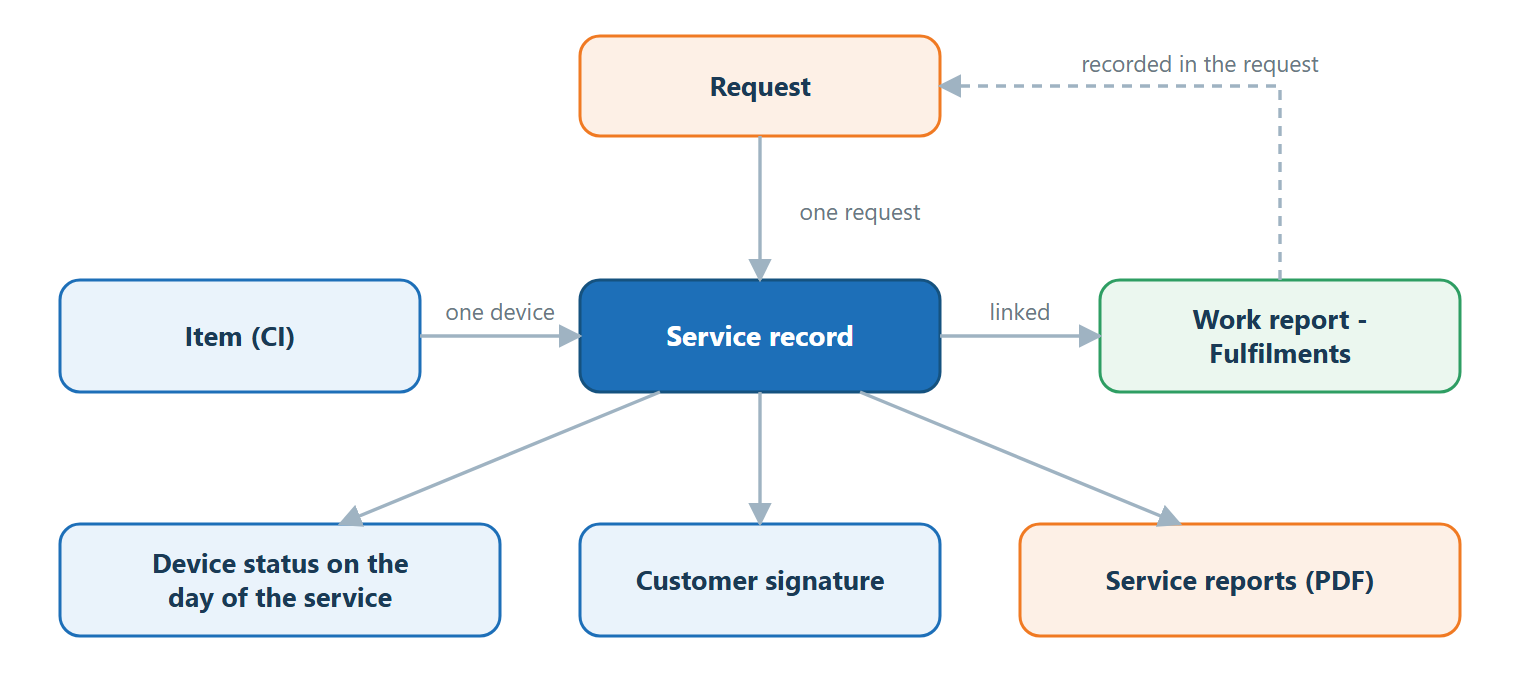
Where the service record belongs
A service record is never created in isolation. It always relates to a specific piece of equipment (CI) and to a specific request under which the service is carried out. The request in CDESK records that a service is required, and the CIs linked to the request specify on which devices the service is to be carried out.
- A service record is viewed and managed on the CI, in its Service Records tab. There is no separate tab for service records in the request detail.
- A service record is not part of a task. Tasks are separate records within a request, which are merely attached to the service record as a work report. If a fulfilment is removed from a service record, the fulfilment itself remains within the request.
- If five devices are serviced under a single request, five service records are created – one for each device.
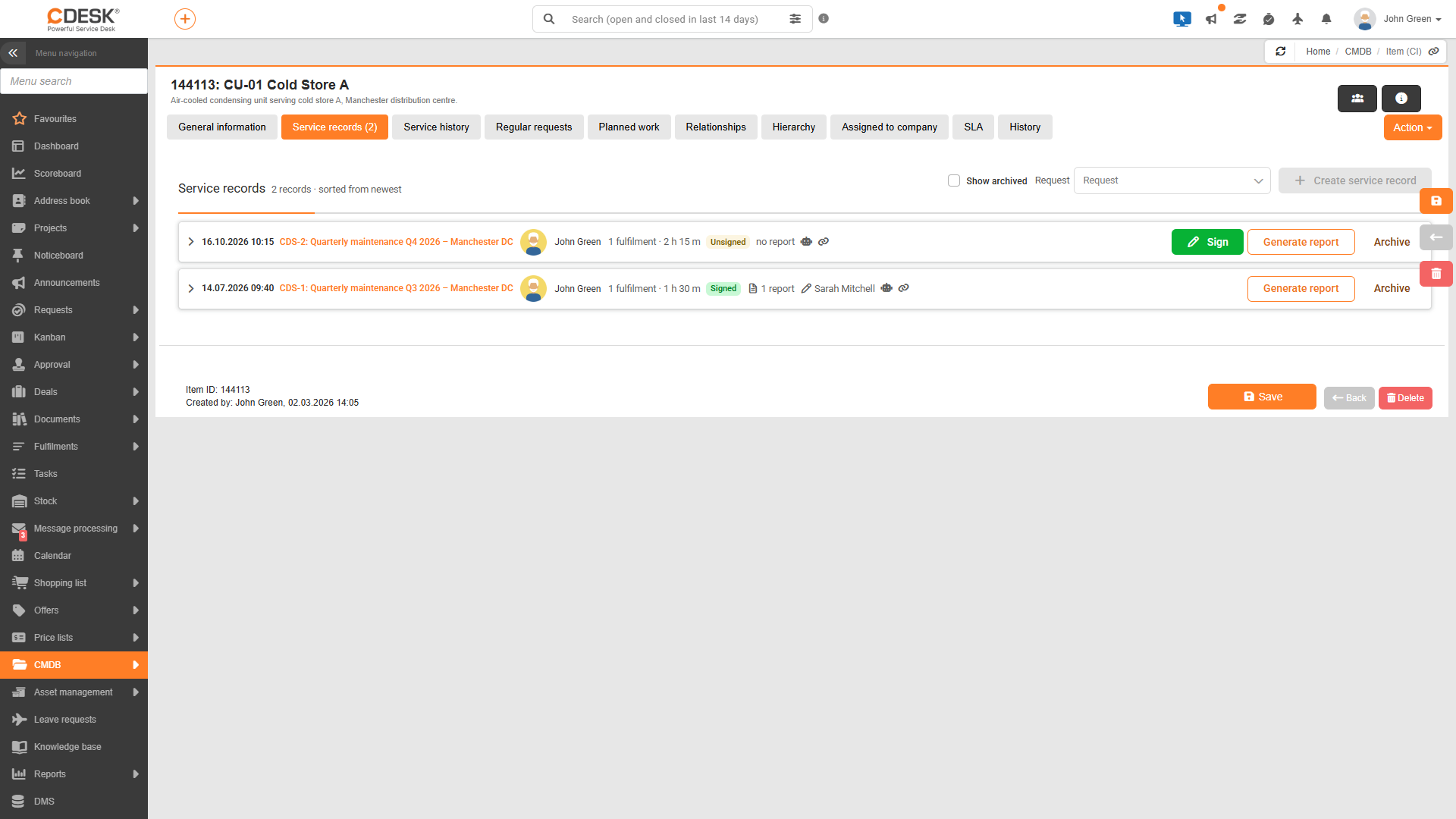
What is included in a service record?
A service record brings together everything relating to the servicing of a piece of equipment in one place. The individual sections are viewed in the record details on the Service Records tab.
| Part of the record | What it contains | Where it is viewed |
|---|---|---|
| Device condition on the day of servicing | Values of CI fields that were filled in at the time the record was created or last updated, for example, measured values or meter readings. | Right-hand side of the record details |
| Work report | Work carried out on this equipment: who did what work and when, how long it took and how many kilometres were travelled, and what materials were applied. | Work Report – Fulfilments |
| Request | The request under which the service was done. Each record belongs to exactly one request. | Record row |
| Service Protocols | PDF documents generated from the service record, which can be sent to the customer. | Service Protocols section |
| Customer’s signature | The signature of the client’s contact person, confirming that the work has been done. The record is locked upon signing. | The bar above the record details and the icon in the record row |
Basic rules
When working with service records, there are several rules that explain most of the system’s behaviour.
- One active record per device and request. For the same device within the same request, there can be at most one active service record, whether unsigned or signed. A new record for the same pair can only be created once the previous one has been archived. There can be any quantity of archived records.
- Until it is signed, the record can be edited. An unsigned record can be updated with new values from the devices and the list of fulfilments can be amended. The record is locked once the client signs it.
- Protocols are independent of the signature. A service protocol can be generated, sent to the customer or deleted at any time – before signing, after signing or even for an archived record.
- This function is enabled at the CI type level. Service records do not have separate global settings. They only function on those CI types for which the administrator has enabled them, and only for users with the appropriate permission.
Was this page helpful?
Thank you for your feedback.