
Manual creation and updating
Last updated
Manual creation is used when the device data was recorded before the CI was linked to the request, or when it is necessary to create a record for a request that has already been resolved. The same place is also used to update an unsigned record, for example if a technician has added to or corrected the values on the equipment after the record was created. Both manual creation and updating require ‘Write’ permission.
Procedure for manual creation:
- Open the CI details and go to the Service Records tab.
- In the tab header, in the Request field, select the request for which you wish to create the record. Only those requests to which the CI is linked, which you can view, and whose type or request template is permitted for that CI type are displayed. Unlike with automatic creation, resolved and closed requests are also displayed.
- Click the ‘+ Create Service Record’ button. The record will be created with the current CI values and all fulfilments of the request linked to this CI. The alert ‘Service record created’ will be displayed.
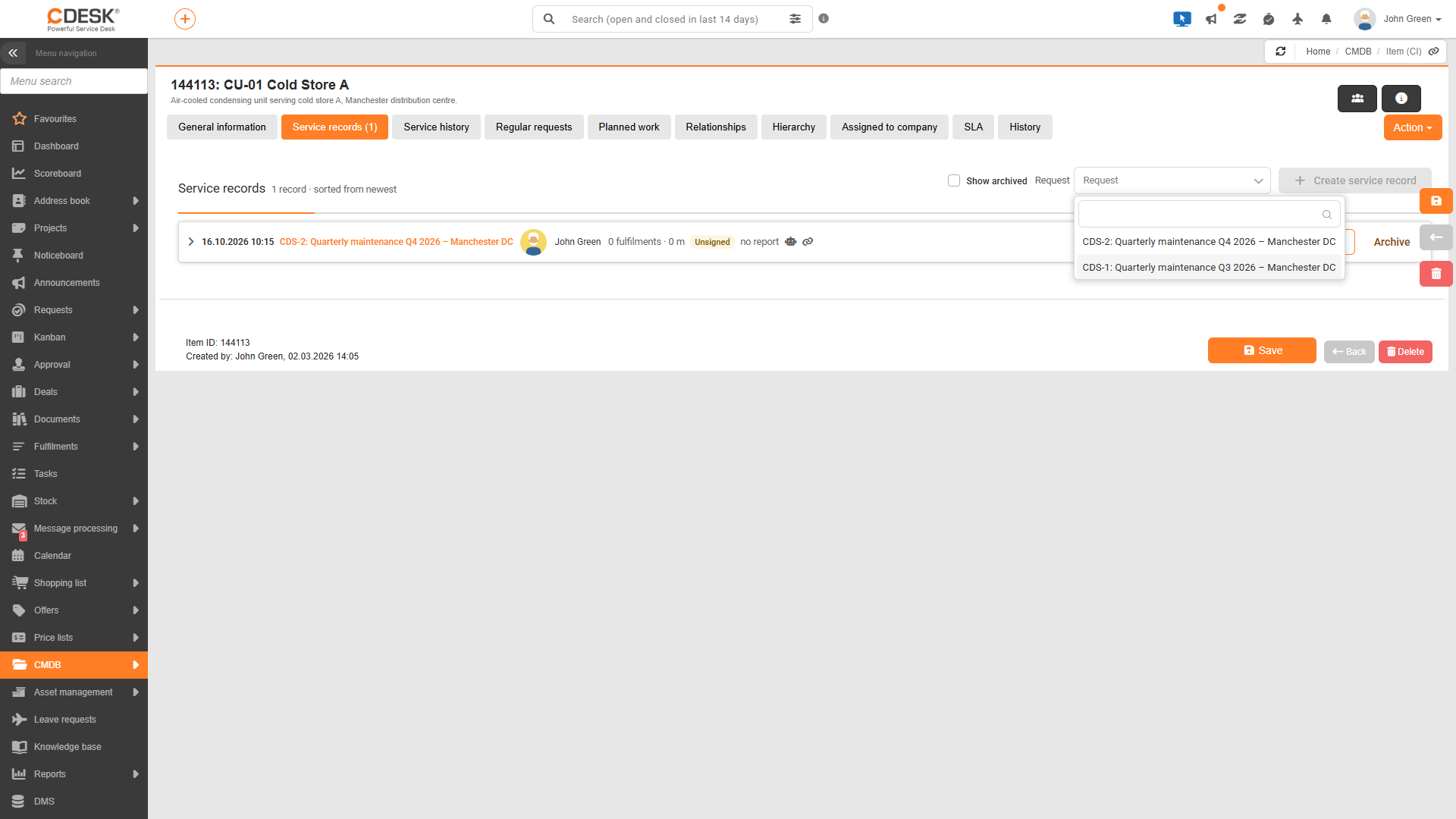
Why is the button inactive?
The ‘Create Service Record’ button is greyed out and inactive until a request has been selected in the ‘Request’ field. If the field does not contain any requests, the text ‘There is no request available for this CI for which the creation of service records is permitted for the CI type’ will be viewed below it. In this case, you need to check the CI type settings and ensure that the CI is linked to a request with an enabled type or template (see the page ‘What needs to be prepared before the first service call’).
Updating an existing record
Once a request has been selected, the button changes depending on whether a record already exists for it:
| Status of the selected request | Button | What happens |
|---|---|---|
| The record does not yet exist | + Create a service record | A new record will be created with the current CI values and the fulfilments of the request relating to this CI. |
| There is an active, unsigned record | Update service record | The device values in the record will be replaced with the current CI values, and the date and author of the record will be updated. The list of fulfilments and protocols will remain unchanged. The alert ‘The service record has been updated’ will be displayed. |
| There is an active, signed record | The button is inactive | The text “The active record is signed and cannot be updated” will be viewed. A new record can only be created once the signed record has been archived. |
Simply correct the incorrect, unsigned record in CI and then update it by clicking the Update Service Record button. A signed record cannot be amended; you must archive it and create a new one.
What information is stored regarding the device condition
When a record is created or updated, the values of user-defined CI fields are saved – that is, fields that the administrator has set up for the CI type, such as measured values, the device condition or counters. These values are displayed in the Device Condition on Service Date section. The following rules apply when saving:
- Values are organised according to the field tabs on the CI type. Fields that do not belong to any tab are viewed in the Other group.
- Along with the values, the names of the fields and tabs valid on the service date are also saved. If a field is subsequently deleted from the CI type, it will no longer appear in the record.
- Only fields that would also be visible in the CI detail are displayed. A field that is hidden on the CI according to presentation conditions will also not be viewed in the record; for example, fields containing the result of a leak test, which are only displayed on the CI after a test method has been selected.
- Tick boxes are viewed as Yes or No. If a field has a description entered, such as a unit, this will appear after the value.
- Once created, the saved device condition can only be changed manually by clicking the Update Service Record button, and only for unsigned records.
Was this page helpful?
Thank you for your feedback.