
Service protocols
Last updated
A service report is a PDF document that summarises the service carried out on the client’s equipment: the device condition on the day of the service, the work carried out, the materials applied and, depending on the settings, the client’s signature. It is generated via the NETGRIF connector (see the page NETGRIF connector settings for service reports). The protocol can be generated directly from the service record or, as before, from the request detail.
Generation from a service record
Generating a protocol from a service record is the simplest way to create a protocol for a single device. The protocol contains values from the service record and the fulfilments included in the record.
- Click the Generate Protocol button in the service record row.
- If only one suitable NETGRIF connector is configured in the system, the protocol will be generated immediately and no selection is required. If there are several suitable connectors, CDESK will first prompt you to ‘Select the protocol to be generated’.
- The generated protocol will be viewed in the Service Reports section of the record details.
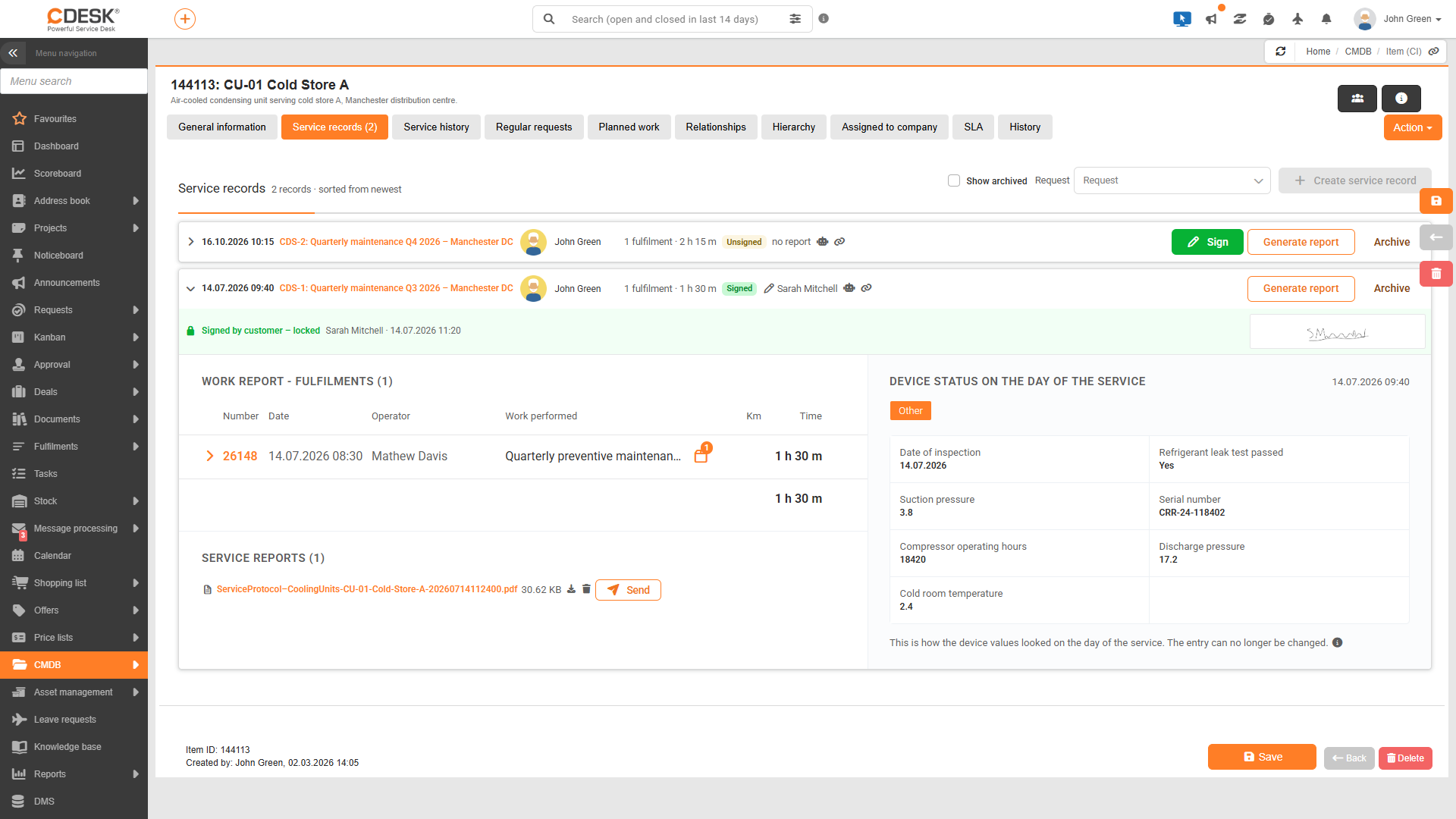
The following rules apply when generating the report:
- A protocol can be generated from an unsigned, signed or archived record. For an unsigned record, it contains a blank signature line in place of the signature.
- The PDF is saved according to the PDF save location field in the connector, i.e. with the service record and, with the common settings, also in the request attachments or, where applicable, in the CI attachments.
- Each generation adds a new protocol. Previous protocols are not overwritten.
Generation from a request
Reports can also be generated from the request detail via the Actions menu. This method is used when several devices have been serviced under a single request and reports are to be created for all of them at once. If the Apply values from the service record for the report checkbox is enabled for a connector, report generation from the request works as follows:
- Only devices with an active service record linked to the request are processed. Devices without an active record are omitted.
- A separate protocol is generated for each processed device, containing the values and fulfilments from its service record.
- Each protocol is attached to the service record of the relevant device and, depending on the settings, also to the request and the CI.
- If no device has an active record, a single protocol is generated without device details and is saved only in other places, such as with the request. If the Service Record Attachment is the only storage location, the generation process will end with the alert “No active service record was found to which the report could be attached”.
Differences between the two methods:
| From the service record | From the request (with values from the service record) | |
|---|---|---|
| For which devices | One piece of equipment, a specific record (including archived ones). | All devices in the request with an active record. |
| Device values | From this record. | From the active record of each device. |
| Fulfilments | Fulfilments included in the record. | Fulfilments included in the active record for each device. |
| Where to attach | To this record. | To the active record for each device. |
Why wasn’t the protocol saved to the CI?
If the protocol generated from a request was saved only in the request’s attachments, even though the connector is also configured to include an attachment to the CI, the equipment did not have an active service record for the request at the time of generation. Such equipment is omitted during generation. The alert confirming successful generation indicates that the log has been saved to the request, the fulfilments and the CI; saving to the service record is not yet indicated in it.
List of protocols
The Service Protocols (N) section in the record details views all protocols generated for the record. For each protocol, the file name and size are shown, and the following actions are available:
- Clicking on the file name opens the protocol in a new browser tab.
- Clicking the download icon saves the protocol to your computer.
- Clicking on the bin icon labelled Delete protocol will detach the protocol from the record upon confirmation. This requires ‘Write’ permission and is also possible for signed and archived records. If the protocol has also been saved in the attachments of a request or CI, it will remain there.
If the record does not yet have a protocol, the text ‘No protocol yet’ will be viewed.
Was this page helpful?
Thank you for your feedback.