


Licence model
The CDESK licensing model is based on a combination of modules enabled within the environment and the permissions of individual users. Licences are not allocated manually; instead, the system automatically assesses them for each account based on what the account is actually using. For this purpose, modules are divided into basic and advanced categories. In addition to these, there are add-on features available for the free Client Access account – if someone only needs to approve tasks, assign work or request leaves, they do not need a user account; they simply need to purchase the relevant add-on for their customer account.
CDESK is available under two business models. The preferred option is the Pay as you go business model, in which the quantity of licences is not determined in advance and billing is based on the quantity of licences used during a given period. The second option is a model with a fixed quantity of licences, designed for companies that need their expenses to be strictly budgeted. The customer pre-pays for a specified quantity of licences at each level for an agreed total, and during branch operation, a check is carried out to ensure that the environment has not exceeded the pre-paid quantity of licences for that level.
Basic modules
The basic modules and features are included in the price of every paid licence and are not factored into the calculation. These include:
- Dashboard
- Scoreboard
- Address book
- SLA
- Calendar
- Substitution
- Reports
- Documents
- User-defined fields
- Kanban
- Mobile app (Android, iOS)
- Desktop app (Windows, macOS)
Advanced modules
Advanced modules are those that the client selects according to their needs, and it is the quantity of these modules that determines the account’s licence tier. The following modules are included as input:
- Requests
- Requests – Work orders
- Fulfilments
- Tasks
- SLO
- Approval
- Message processing
- Deals
- Offer and Price Lists
- Projects and project deals
- Projects – subcontracts
- Warehouses
- Contracts
- Knowledge base
- Asset and Inventory Management
- Borrowings
- Leaves requests
- Noticeboard and Announcements
- Device repair
- Omnichannel – WhatsApp Chats
- Omnichannel – VoIP
The price list also includes other modules and features that do not contribute to the quantity of advanced modules. These are features or items charged for separately, rather than according to the accounts that use them – for example, the configuration database, where the fee depends on the quantity of entries, or connections to external systems that are linked to the entire environment.
Licence levels
An account can be included in one of four paid tiers, or in the free customer access option.
| Tier | Meaning |
|---|---|
| ECONOMY | The basic paid tier for assignees with a small quantity of advanced modules. |
| SMART | A level for assignees with a moderate number of advanced modules. |
| MASTER | A tier for users with a wide range of advanced modules. |
| ENTERPRISE | A bespoke solution for environments not covered by the standard levels. The range is agreed on a case-by-case basis. |
| Client access | A free account for end users, clients and management for submitting requests, communicating, approval and viewing an overview. The user is not an assignee. |
The paid tiers differ from one another in terms of the quantity of advanced modules they include. Each plan includes 12 core modules (listed in the table above) free of charge, as well as authentication via Entra ID or Google and free Client Access accounts for customers/end users.
There is a charge for creating and managing users via Active Directory or Entra ID. The quantity of accounts linked to Active Directory / Entra ID is reported in the licence report.
Additional features for the Client Access account
An account can be included in one of four paid tiers, or in free customer access.
| Additional features for Client Access | Condition for inclusion in the licence |
|---|---|
| Approver | The account is included in the system group of approvers (selected with the short name APP in the lists) and also has access to at least one of the following authorizations: Approval – request approver, simple approval or leaves approval. |
| Leaves applicant | The Leave Requests module is enabled in the global environment settings and the account has permission to create leaves records. |
| Adding Fulfilments | The Fulfilments module is enabled in the global environment settings and the account has permission to create fulfilments, whether general or internal. |
| Borrowing request | The account has authorization to create borrowing requests in the configuration database. |
| Deals (invoicer) | The Orders module is enabled in the global environment settings and the account has the invoicer flag set. |
Note: Add-ons are assessed for accounts with Client access level, i.e. for customer accounts.
Criteria for counting an advanced module towards the licence quota
Only those advanced modules that are enabled for a given account and for which the user typically has permission to create and edit records are counted towards the licence limit. A free customer account is sufficient for reading records from any module.
The licence calculation depends primarily on the account’s assignment to a system group. If an account is included in multiple groups, the group with the broader range takes precedence; in other words, the ‘assignee’ assignment takes precedence over the ‘customer’ assignment.
- Administrators, Operators and Assignees – for these roles, the licence is calculated based on the quantity of advanced modules. Every operator and assignee is included at least at the ECONOMY level, even if they do not have permission for any advanced modules.
- Customer accounts and approver accounts – these automatically receive Client access. Their permissions are not counted towards the quantity of modules. For example, a customer account’s right to submit requests is part of the free account and does not increase the licence count. Beyond the scope of the free account, only the add-ons described in the previous chapter are charged to them.
For accounts where the licence is determined on a module-by-module basis, each advanced module is then assessed separately. It is only included in the quantity if all three conditions are met simultaneously:
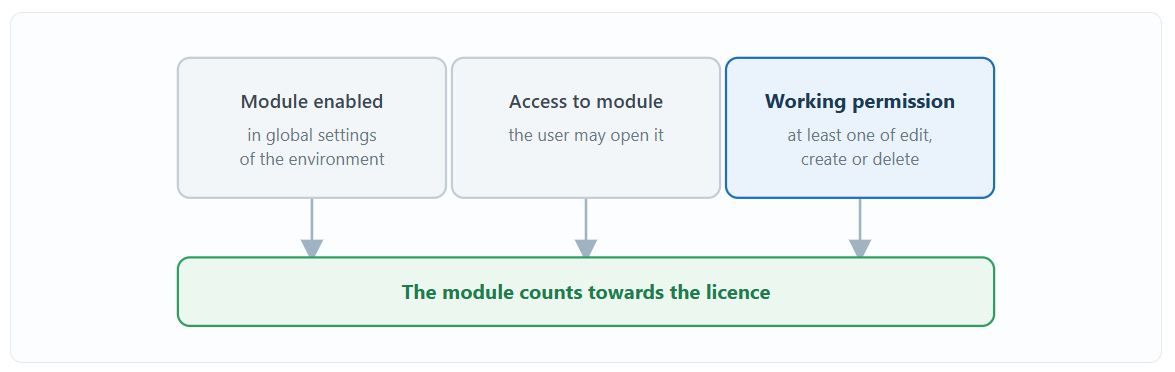
1. The module is enabled in the global environment settings. If it is disabled, permissions are irrelevant and the module will not be assigned to anyone.
2. The account has access to the module, meaning it is permitted to open it at all.
3. The account has at least one authorization to work with records in that module – to edit, add or delete them. Authorizations taken over from groups are also taken into account.
Read-only permission does not increase the licence quantity. If an account has a module for viewing only, it is not included in the quantity. Details of which permissions are linked in this way and how they are selected in the list can be found in the ‘Permissions’ section of the documentation, in the chapter ‘Impact of permissions on licences’.
Conditions are assessed separately for each account per billing period. Accounts in the same position therefore do not necessarily have the same licence – if their permissions differ, the quantity of modules counted and, consequently, the tier to which they are included will also differ.
For some modules, the condition is assessed based on several authorizations at once. For example, in the case of requests, in addition to records, access to third-party records, subordinates’ records, the catalogue of requests and internal requests is also assessed. It is sufficient for an account to have at least one of these.
Automatic licence calculation
The licence is assessed on a calendar month basis. Once a day, the system records the number of advanced modules to which each account had authorization on that date. At the end of the month, the average daily quantity of modules is calculated from these daily records and rounded up to the nearest whole number.
The resulting figure determines the licence tier. This means that authorization granted for only part of a month is reflected only partially in the average, but rounding up ensures that even a module used for a short period is accounted for in the licence.
Example: An assignee has authorization to one advanced module for the whole month and to another for only half the month. The average quantity of modules per day is 1.5, which, when rounded up, is 2 modules. Their licence tier is determined based on this quantity.
The limits on the quantity of modules for each level are set out in the licence agreement and can be found in the current price list or in your contract.
Please note: Changes to permissions will not be reflected in the licences immediately. The data is recalculated automatically once a day, so you will only see the effect of the change in the report after the following recalculation.
Licence overview and export
You can find the current state of licences in the following places:
- In the Users and Groups → Daily and Monthly Report section – a licensing report for the environment.
- In the user details, on the User Groups and Licence tab – the licence for that specific account.
You can export the report for a selected calendar month by clicking the ‘Export’ button. The monthly licence report is automatically sent on the morning of the 1st day of the following month to the email address of the main administrator for each environment, with a blind copy sent to the addresses specified by the server operator. The sending settings are available at server level in the licence model settings (managed by the service root account).
Note: Access to the report requires the Reports → Licence Report permission in the permissions tree, which is enabled by default only for administrators. If you cannot see the report in the menu, check this authorization in the account details on the Permissions tab. Furthermore, the presentation of the Licences tile in global settings is subject to server settings, which are configured at server level, not environment level.
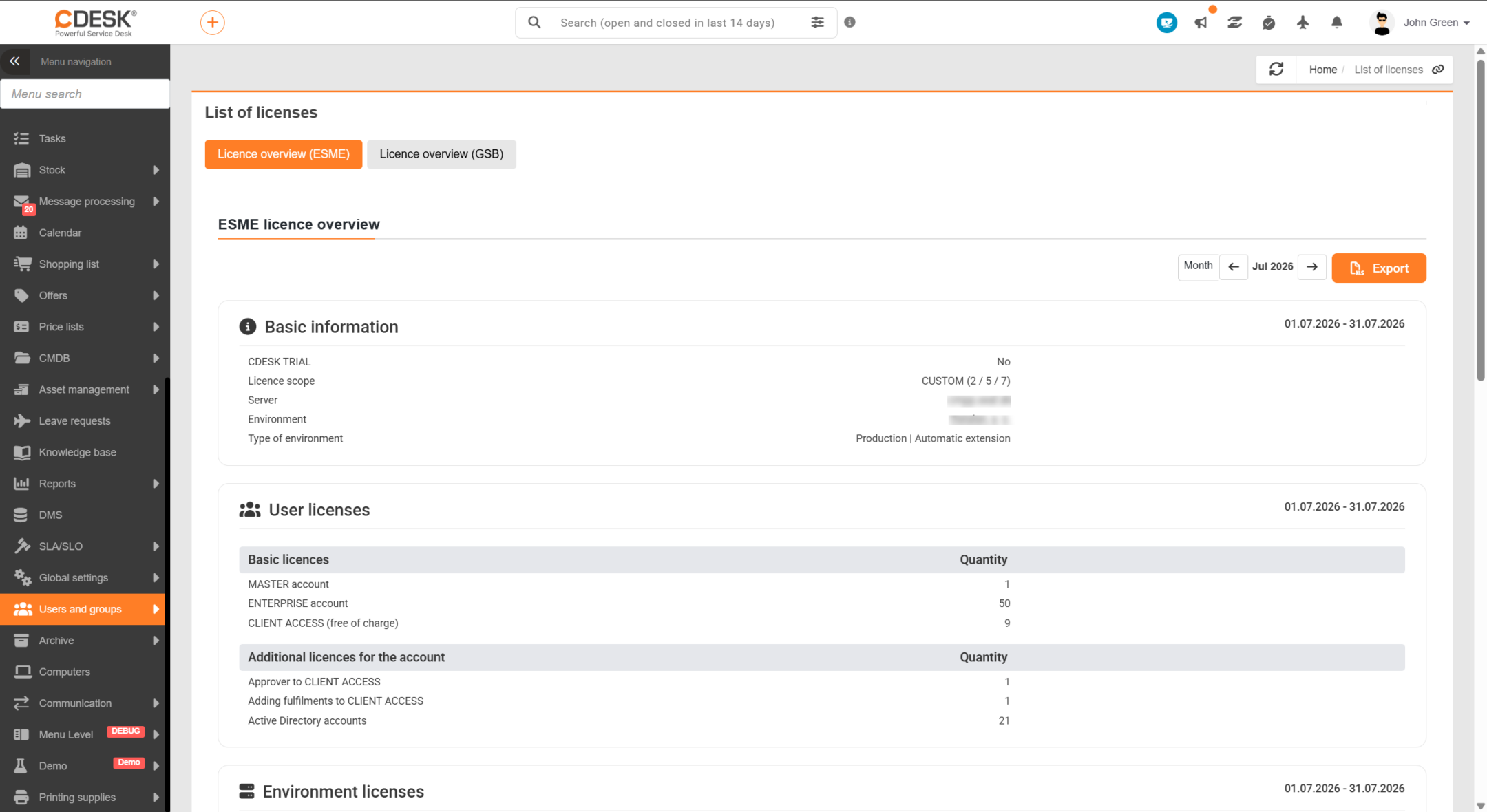
The report always relates to a single environment, namely the one in which the user is logged in. In addition to account licences, the report also includes other billed items for the environment, such as:
- the quantity of managed accounts when linked to Active Directory,
- the quantity of SMS notifications,
- records in the configuration database exceeding the included quantity,
- Disk space for attachments,
- operation under a custom domain,
- connectors used,
- Customer Monitor licences.