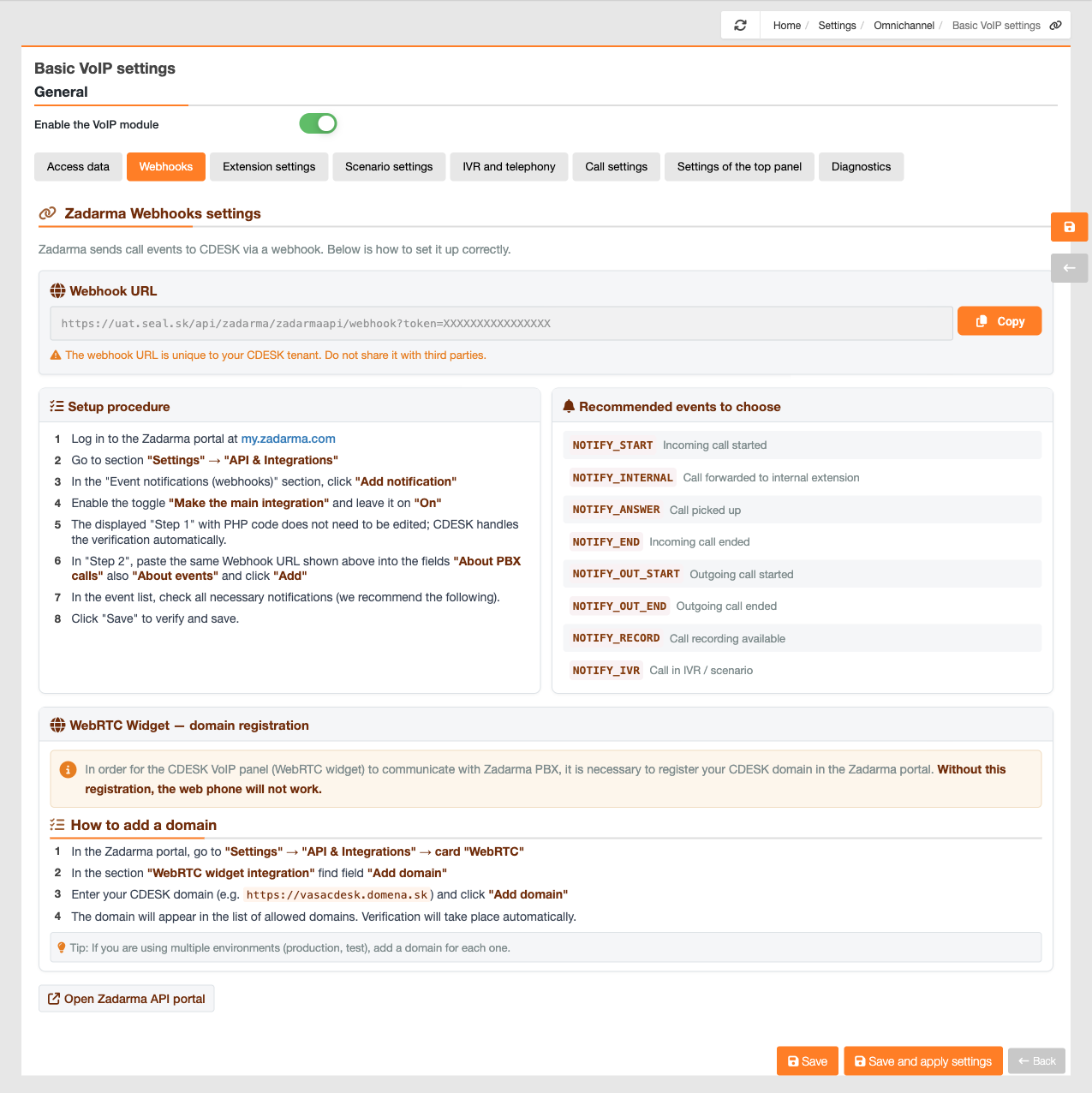
Webhooks are the way Zadarma makes an announcement to CDESK that something has happened with a call – that someone is calling, that the call has been answered, or that a recording is ready. Without them, CDESK is unaware of calls in real time, so this is a step that cannot be skipped.
In the CDESK tab, you’ll view the Webhook URL and a button to copy it. This address is unique to your CDESK tenant, so please do not share it with third parties.
The settings procedure in the Zadarma portal is as follows:
1. Log in to the Zadarma portal.
2. Go to the section for API and notification settings.
3. In the ‘Event notifications (webhooks)’ section, enable notifications.
4. In the next step, inserted the copied Webhook URL into both fields – ‘About PBX calls’ and ‘About events’ – and confirmed it.
5. In the list of events, tick the notifications that you want Zadarma to send.
6. Save the settings – Zadarma will confirm and confirm the address.
We recommend ticking these events, as each one corresponds to an action that CDESK performs with a call: ‘Incoming call started’ views a ringtone in the panel; ‘Call forwarded to an internal extension’ assigns the call to the correct operator; ‘Call answered’ switches the panel to the active call status and starts counting the time; ‘Incoming call ended’ and ‘Outgoing call ended’ terminate the call and add it to the call log; ‘Outgoing call started’ logs the dialling from CDESK; ‘Call recording available’ attaches the recording to the call and the request; and ‘Call in IVR/scenario’ provides information on the proceedings of the call within the automated voice system.
The second part of the tab is the domain registration for the WebRTC widget. Without this registration, the web phone will not work. In the Zadarma portal, go to API settings; on the WebRTC tab, find the field for domains and enter your CDESK domain. The domain will be viewed in the list of authorised domains and authentication will take place automatically. If you are using multiple environments, such as production and test, add the domain for each one separately.