In CDESK, the service catalogue is part of the configuration database. It is an item type with the category Services. From the perspective of service management, the basic structure is the same as for other items (CI).
NOTICE – In this section of the documentation and availability calculations, the term “INCIDENT” refers to types of request records for which service availability tracking is actively enabled. These records affect the overall availability of the service.
For services, the following tabs are important under the item (CI): SLA and Service availability.
- SLA Tab – option to select an SLA for an item. You can add an SLA to an item by clicking the button below the selection field. To select an SLA, the company must be listed on the General Information tab. If you do not select a user-defined SLA for the item, the SLA of the parent item will be used (Service Level Agreement). The SLA specifies support working hours and required completion deadlines. The parameters of the selected SLA are displayed after clicking the SLA Details button. It is also possible to create a new SLA directly from the item (CI) by clicking the + Add SLA button.
- Service Availability tab – records SLOs (Service Level Objectives). An SLO specifies the service’s operating hours—i.e., when the service is to be provided—and also defines the required service availability as a percentage and the maximum outage duration. The parameters of the selected SLO are displayed after clicking the SLO Details button. If the list does not contain an SLO with the required parameters, you can create a new one directly from the CI by clicking the + Add SLO button. Note: Availability will not be calculated for a service without a selected SLO.
- Service availability data – is displayed only for a selected SLO, either by month or by year. You can switch between periods to view availability information from the past:
- Expected availability – is the guaranteed availability as defined in the SLO. This data corresponds to the expected availability setting in the SLO.
- Current availability – displays the real-time availability of the service for the specified period
- Maximum outage duration – the continuous period during which the service may be unavailable as defined by the SLO. This figure corresponds to the maximum outage duration setting in the SLO.
- Number of Exceeding Outages – the number of outages that lasted longer than the maximum outage duration. This number also includes completed planned maintenance.
- The method for calculating availability – is detailed below in the chapter Calculation of Service Availability. In case of uncertainty regarding the availability calculation, the application administrator can use the button Periods, which displays information about the calculated unavailability by days for the entire selected period.
- Important – for both monthly and annual periods, the calculation is based on the actual number of days in the specified period
- Service Outages – displays incidents and scheduled maintenance related to the selected service, along with information on whether service availability was affected or the maximum downtime was exceeded.
- Service availability data – is displayed only for a selected SLO, either by month or by year. You can switch between periods to view availability information from the past:
Service Availability Calculation
This chapter uses the following abbreviations for calculations:
| AE% | Expected Availability in % (according to SLO) | Expected Availability in % |
| AE | Expected Availability | |
| AC% | Current Availability in % | Current Availability in % |
| AC | Current Availability | |
| AM | Monthly Availability | |
| HM | Number of operating hours per calendar month | Operating Hours per Month |
| OS | Sum of Outages | |
| OMax | Maximum Outage Duration (according to SLO) | Maximum Outage |
| OE | Number of Exceeded Outages | |
| ACUM% | Cumulative Availability in % | Cumulative Availability in % |
- Expected availability in % – retrieved from the selected SLO based on the service’s operating hours
- Expected availability in time – calculated as
, where
is the expected availability,
is the expected availability in %,
is the number of operating hours in a calendar month, the result is displayed in hours and minutes
- Current availability in % – calculated as
, where
is the current availability in %,
is the current availability in time,
is the monthly availability in time, the result is displayed in %, the maximum value is 100%
- Current availability in time – service availability, calculated as
, where
is current availability over time,
is monthly availability over time,
is the sum of outages
- Monthly availability over time – service availability 100% of the time in a given month, taking into account the service’s operating hours
- Maximum outage duration (time) – retrieved from the selected SLO
- Cumulative availability in % – represented in the service details as availability for the calendar year, calculated as
, where
is cumulative availability in %,
is the sum of current availability over time,
is the sum of monthly availability over time, the result will be displayed as a percentage, with a maximum value of 100%
Factors affecting service availability
The unavailability of the service is expressed as the sum of outages affecting service availability. Outages affecting service availability are:
- An incident affecting the availability of the service—where the service unavailability is defined by the start and end times of the service outage in the incident record, and the “Affects service availability” option is checked in the incident. In such a case, service unavailability is calculated only:
- for the service uptime within the meaning of the configured SLO
- for the time outside the planned maintenance window defined by the planned start and planned end
- for the time when SLA counting is paused in the Paused state or another state that pauses SLA counting
- Scheduled work – whose actual start and actual end exceed the scheduled interval, bounded by the scheduled start and scheduled end of the scheduled work. In such a case, service unavailability is calculated only:
- for the service uptime within the defined SLO
- for the time outside the planned work interval defined by the planned start and planned end
Service availability is not affected in the following cases:
- Incident with no impact on service availability – i.e., the Affects service availability checkbox is not selected on the incident. This field can be automatically controlled by the cause/reason for closing the request.
- Incident affecting service availability – i.e., the Affects service availability field is checked on the incident, if the service outage interval defined on the incident by the start and end of the outage falls within the interval:
- Outside the service operating hours – defined in SLO
- Planned work – bounded by the planned start and planned end of the work
- Planned work – whose actual start and actual end fall within the interval bounded by the planned start and planned end
Service Outages
A list of service outages is available at Configuration Database → Service Outages and includes all types of events that may affect service availability, regardless of whether service availability was actually impacted.
For outage tracking:
- Incidents – represented by requests of the type Incident – the start and end of the outage are defined by the values specified in the incident.
- Scheduled Work – the start and end of the outage are defined by the actual start and actual end of the work. Unscheduled planned work is not included in the list.
In the event of outages affecting service availability, or if the maximum outage duration is exceeded, a red exclamation mark appears at .
Important – There may be cases where an exclamation mark appears in the outage list indicating an impact on service availability, yet the service continues to show 100% availability. This occurs when the service was unavailable outside of business hours. In such cases, its availability is not reduced.
Service Availability and Outage Report
Both the service outage report and the service availability report are available from the outage list in the section Configuration Database → Service Outages, as well as in the section Reports → Configuration Database → Service Availability and Reports → Configuration Database → Service Outages.
Service Availability Report
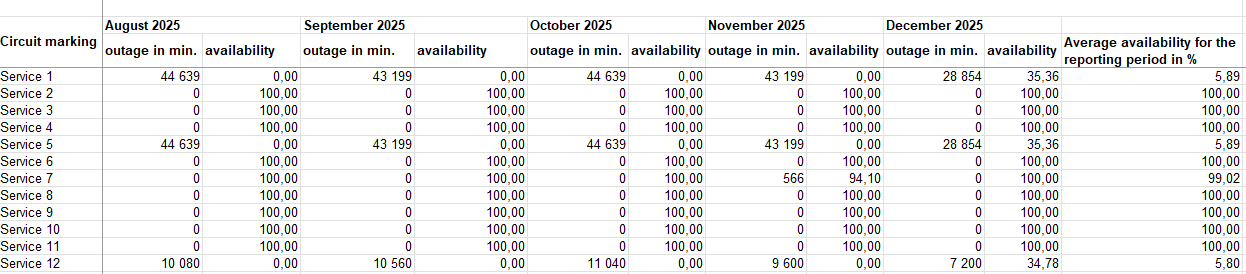
The service availability report generates an XLS file containing a list of all services for the selected company and the selected time period. For each service, the report provides information on the achieved availability (in %) for each month of the selected period, as well as the duration of any service downtime.
Service Outage Report
The service outage report generates an XLS file containing the services for the selected company and the specified month, along with all events recorded in the service outage log that occurred or were resolved during the selected period. The report also calculates the service availability for the selected month. If a service is listed on multiple rows due to multiple events, the total availability is always displayed, not just for the specific event.