


The integration of CDESK with the 3CX PBX links calls made via the 3CX PBX itself to the Request module. Calls are routed via the PBX; CDESK receives information about each call, the caller’s details are viewed by the operator, and a request or fulfilment can be created from the call.
3CX is a standalone telephone system that you operate – either in the cloud or on your own server – to which you connect your custom telephone line from your telecoms provider. CDESK connects to it via its API, which 3CX only makes available with the top-tier AI edition licence. The operator receives the call themselves on their equipment: on an IP phone, in the 3CX app on a computer, in the 3CX web client in a browser, or on a phone. CDESK adds to the call what the PBX cannot provide – a link to the client, their requests and a list of the work carried out.
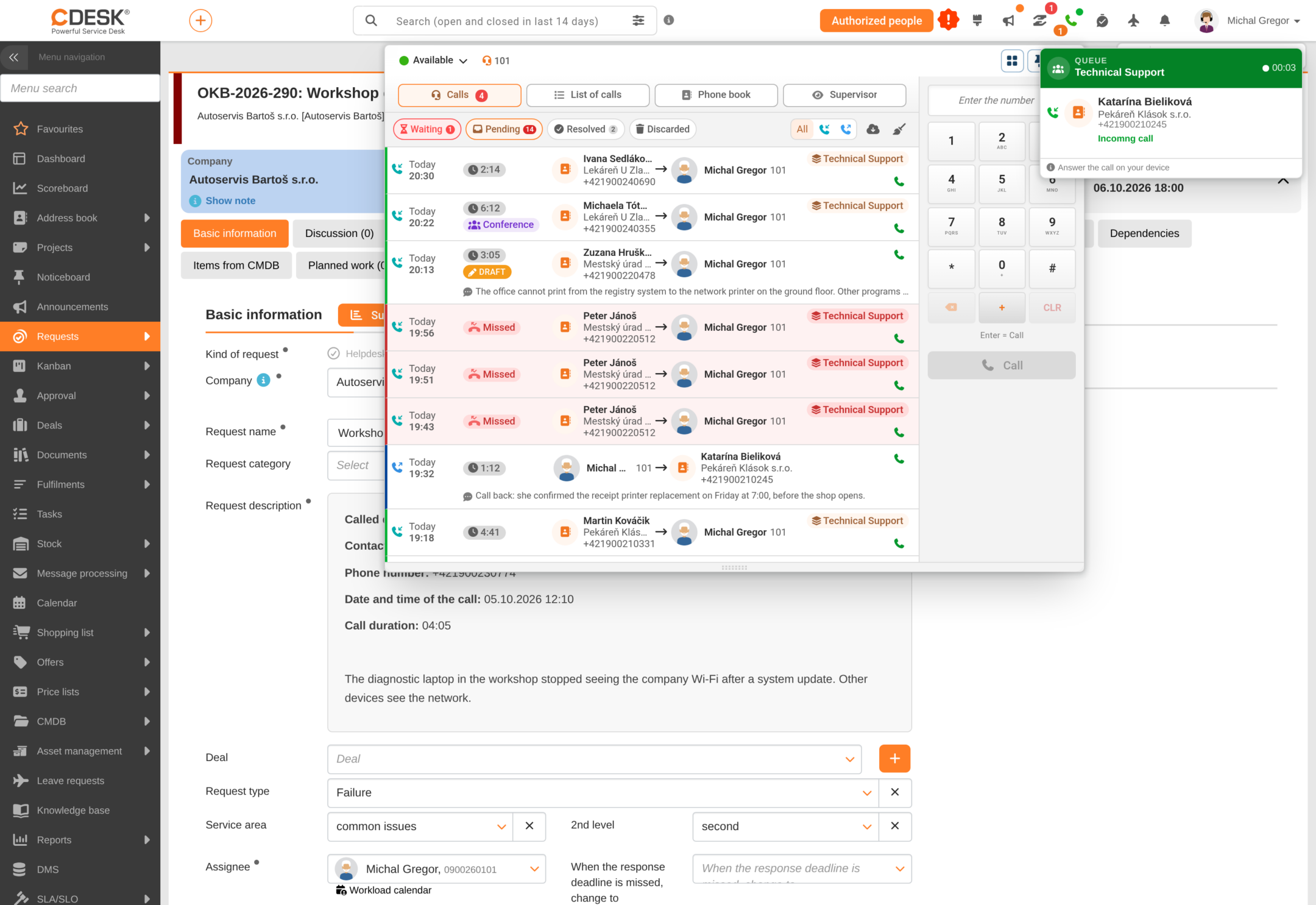
The PBX manages the calls and CDESK is notified of every change in real time. The operator can therefore see in the top panel of CDESK that their phone is ringing, who is calling and what open requests the caller has. After the call, it is done without having to transcribe data from one system to another, and both the recording and the call details remain linked to the request.
Tasks are clearly divided between the switchboard and CDESK. Everything relating to the telephone system itself – extensions, teams and their members, the voice menu, working time, on-hold music, voicemail and call recording – is configured in 3CX. Only settings relating to CDESK are configured within CDESK: assigning extensions to users, queue monitors, and the way in which a call is converted into a request or a fulfilment. CDESK does not write to the PBX configuration, so the same settings are never configured in two places.
The VoIP module is part of Omnichannel. It is enabled in the global settings, and users’ access to the telephone is controlled by permissions, just as with other modules.
CDESK supports three VoIP providers. VIPTel is a Slovak VoIP operator; calls are handled via the external MicroSIP application. Zadarma is a cloud-based provider suitable for smaller businesses – calls can be answered directly within CDESK, and some of the PBX settings are managed in CDESK. 3CX is a custom PBX system that offers full control over both configuration and the choice of operator; however, its deployment and management require in-house technical expertise.
What integration enables
The following overview lists the features available with the 3CX PBX in CDESK. Each field is described in detail in the subsequent chapters.
Call notification and caller identification – an incoming call is viewed in the top panel of CDESK. The number is paired with a contact or user registered in CDESK, so the operator can see who is calling and any existing requests they may have.
Making a call from CDESK – the number is dialled from the dial pad in the top panel, from the phone book, or by clicking on a number in a request, contact or work order. The switchboard first rings the operator’s handset and, once the call is answered, dials the number being called.
Phone book and number identification – the top panel contains a common list of colleagues with extensions, customer contacts and CDESK users. An unknown number is saved under ‘Unassigned’, and the operator can assign it to a contact so that CDESK recognises it the next time it calls.
Call forwarding and transfer – a connected call can be forwarded to a colleague or to another number. The operator can transfer a call waiting in the queue to their own extension.
Call queues – for each queue from the switchboard, CDESK allows you to configure how its calls are handled: default company, request template, tags and queue monitors.
Requests and fulfilments arising from a call – a call generates a request, or possibly a linked fulfilment or deal. A call can also be linked to an existing request or handled as a separate fulfilment without a request.
Calls associated with a request – in the request detail, the ‘Calls’ tab contains all calls associated with it, along with their recordings. From there, you can call the requester or the assignee, and the new call will be automatically linked to the request.
Call recordings – recordings from the switchboard can be played back directly in CDESK and, if the ‘Attach call recording’ setting is enabled, are automatically attached to the request.
Transcription of recordings to text – a recording attached to a request can be transcribed into text organised by speaker, provided this feature is available in your environment.
Extension status – the operator can change their status on the switchboard (available, away, do not disturb) directly from CDESK. The status can also be changed automatically when logging in and out of CDESK.
Call log – an overview of calls on hold, outstanding calls, calls that were done, and dropped calls, a call list with filters, and bulk dropping of calls.
Supervisor mode – real-time overview of calls, agents and queues for team leaders.
Synchronisation with the PBX – call history is regularly retrieved from 3CX, and the CDESK phone book can be sent to the PBX so that 3CX also views callers’ names.
Call statistics – a regular report on calls in queues and on extensions in XLSX format.
What integration does not allow
The following limitations arise from the division of tasks between CDESK and the 3CX PBX. These are features of the integration, not faults. It is advisable to be aware of them before deployment.
CDESK is not a telephone. Calls are answered, put on hold and muted on the operator’s device or in the 3CX app. From the CDESK top panel, you can forward or end an active call.
The PBX is managed in 3CX. Extensions, queues, telephone numbers, voice menus, working time and voicemail are configured in the 3CX administration panel. CDESK merely views them and assigns them to users.
Call monitoring and call whispering are done by 3CX. The supervisor mode in CDESK provides an overview and links these functions to 3CX.
Voicemail is handled by the 3CX PBX, which delivers links via email.
Only one VoIP provider is active at any one time for the entire environment (3CX, Zadarma or VIPTel). The settings for the previous provider are not deleted when switching.
The CDESK mobile app does not support making calls via 3CX. On phones, the 3CX app for iOS or Android is used.
Integration requires a 3CX AI Edition licence. Lower editions (SMB Free, Basic, PRO) do not provide an API for integration, and CDESK will not connect to them or receive real-time call information.
Deployment requirements
Before you begin setting up CDESK, please ensure you have the following:
A dedicated 3CX version 20 PBX with an AI Edition licence, which is the only version that provides access to both the Configuration API and the Call Control API. Integration has been confirmed on 3CX V20 Update 9, AI Edition, with 8 concurrent calls.
A registered telephone line (SIP trunk) from your telecoms provider with a quantity of channels appropriate to your expected traffic, and extensions created for operators.
The client API created in the 3CX administration panel with the selected operator extensions – Client ID and Client Secret.
The PBX’s FQDN address and authorised access from the CDESK server, if IP restrictions are enabled in 3CX.
The Omnichannel module must be enabled, with the VoIP module enabled within it, in the CDESK global settings.
A user with permissions for Global Settings (both save and edit), Omnichannel and Omnichannel → VoIP, who will configure the integration.
In addition, each operator needs an IP phone, the 3CX app installed, or to be logged into the 3CX web client in a browser. Without this, they will be able to see calls in CDESK but will not be able to answer them.
Inova Logic, s.r.o. is an official 3CX partner. You can purchase or upgrade your 3CX licence, including the AI edition, through us – please contact your CDESK sales representative or download the PBX via the 3CX download link for Inova Logic customers.
The procedure for setting up the switchboard is described in the chapter ‘Setting up the 3CX switchboard’.