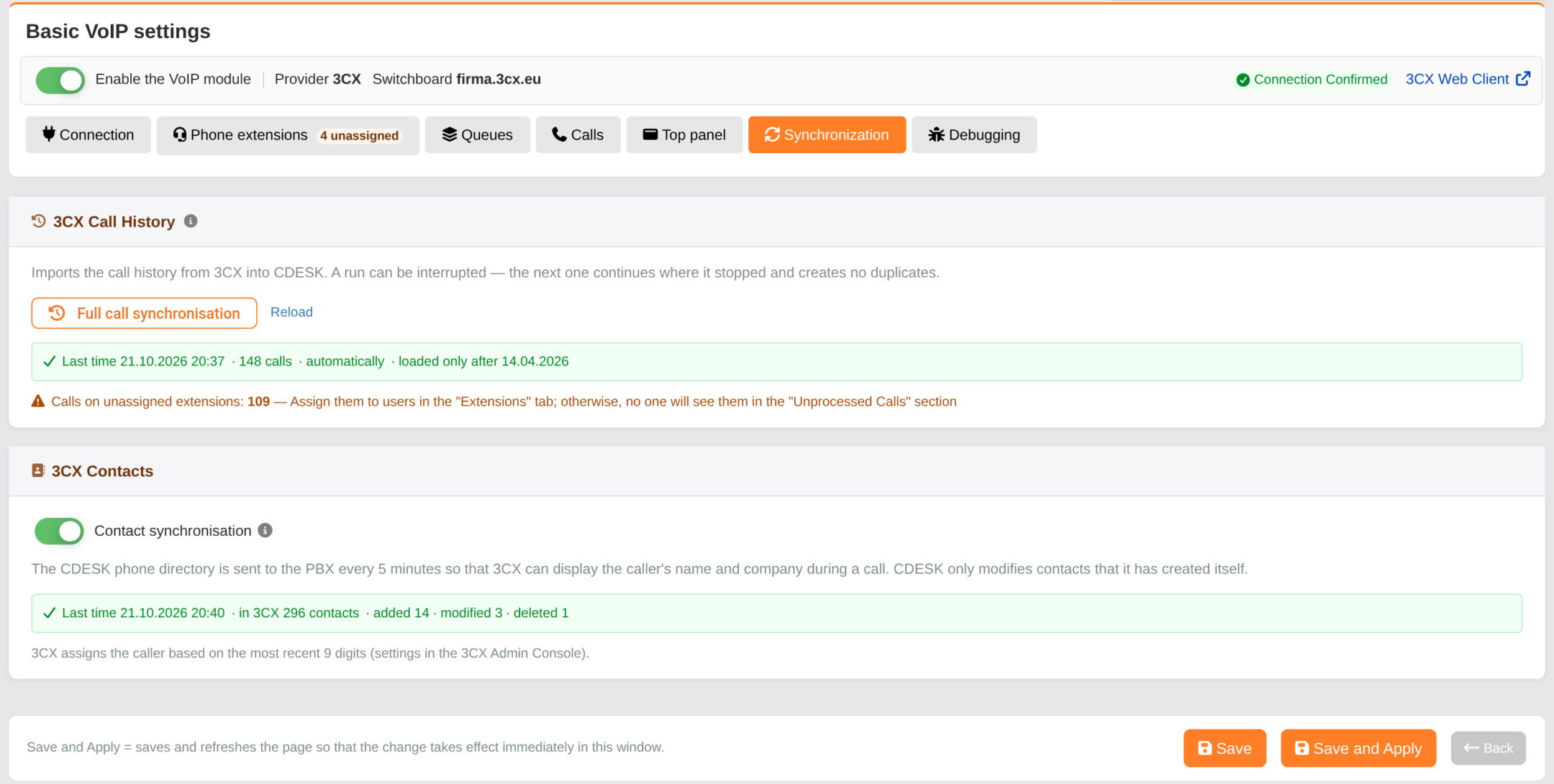
CDESK and the PBX exchange data in both directions: call history is imported from 3CX into CDESK, and the CDESK phone book can be exported to 3CX. The Synchronisation tab is viewed once the access data have been saved. Call history can only be synchronised once the connection has been confirmed (Confirm connection in the Connection tab); if the access data are changed, the connection must be confirmed again. Contact synchronisation can be enabled even without authentication.
Call history from 3CX
Calls are received by CDESK in real time and, to be on the safe side, the call history is also updated automatically from the switchboard. Checks are carried out every 15 minutes and whenever an operator with an extension logs into CDESK. However, a single client’s call history is updated at most once every 30 minutes and covers a maximum of 14 days in the past. This means that calls which took place, for example, during a connection outage will also appear in CDESK. Older calls are only retrieved via full synchronisation.
The ‘Full Call Synchronisation’ button can be used to load the history manually, for example during initial deployment. Calls are loaded in 30-day periods, with the default being 6 months back. Overdue incoming calls from the last 30 days are assigned to operators by extension. The process can be paused – the next run will continue where it left off and will not duplicate any data. If the volume is large, synchronisation will pause with the alert ‘Synchronisation is paused…’ and must be run again. Once the entire history has been loaded, the button will only refresh the last 30 days. ‘Reload’ link (displayed after the first synchronisation) reloads the history from today’s date. Only a user with permission to edit global settings can run a full synchronisation.
The result of the last run is viewed below the button: time, quantity of calls, whether it was an automatic run, how far back the history has been loaded, or ‘Unfinished – run again’. If there are calls on extensions in the history without an assigned user, the ‘Calls on unassigned extensions’ warning will display their numbers – these must be assigned in the ‘Extensions’ tab.
3CX Contacts
Once the ‘Contact Synchronisation’ switch has been enabled and the settings saved, company contacts and users from the CDESK phone book will be sent to the switchboard every 5 minutes. The PBX will then display both the caller’s name and company (the company name in brackets after the name) during a call. Only numbers in international format are sent. CDESK only modifies contacts that it has created itself – contacts created directly in 3CX remain unaffected. If a contact is manually deleted in 3CX, CDESK will recreate it. After synchronisation is disabled, VoIP is disabled or the provider is changed, CDESK will delete its contacts from 3CX. The overview shows the time of the last run, the quantity of contacts managed by CDESK in the PBX, and the quantities of contacts added, edited and deleted. Contacts declined by the PBX are displayed only if there are any.