


The Projects module is used to manage larger changes and projects that have an objective, a date, responsible persons and interrelated tasks. Examples of projects include the modernisation of IT infrastructure, the opening of a new branch, the replacement of an information system or preparation for an audit. The management principle is the same for every project: the project is broken down into smaller units, responsibilities and dates are defined, dependencies are established, and proceedings are then monitored.
In CDESK, a project is not a separate record distinct from day-to-day operations. The work itself takes place within requests and tasks, and the project creates an overarching structure for them, including dates, completion status and financial details.
Project structure
Within CDESK, the project is divided into four levels. Each level has a different task within the project, as shown in the following table.
| Level | Meaning | Example |
|---|---|---|
| Project | Objective – what is to be achieved and by when. Covers the entire solution for a single customer. | Modernisation of IT infrastructure |
| Project deal | A phase or larger part of a project with its own date, responsible person and price. Project deals can be further subdivided into child project deals. | Analysis, Procurement, Implementation, Migration and Testing |
| Request | A specific work assignment for the assignee, including discussions with the customer, attachments, fulfilments and history. | Data Migration |
| Task | A specific step carried out by a particular assignee. | Preparation of the test environment |
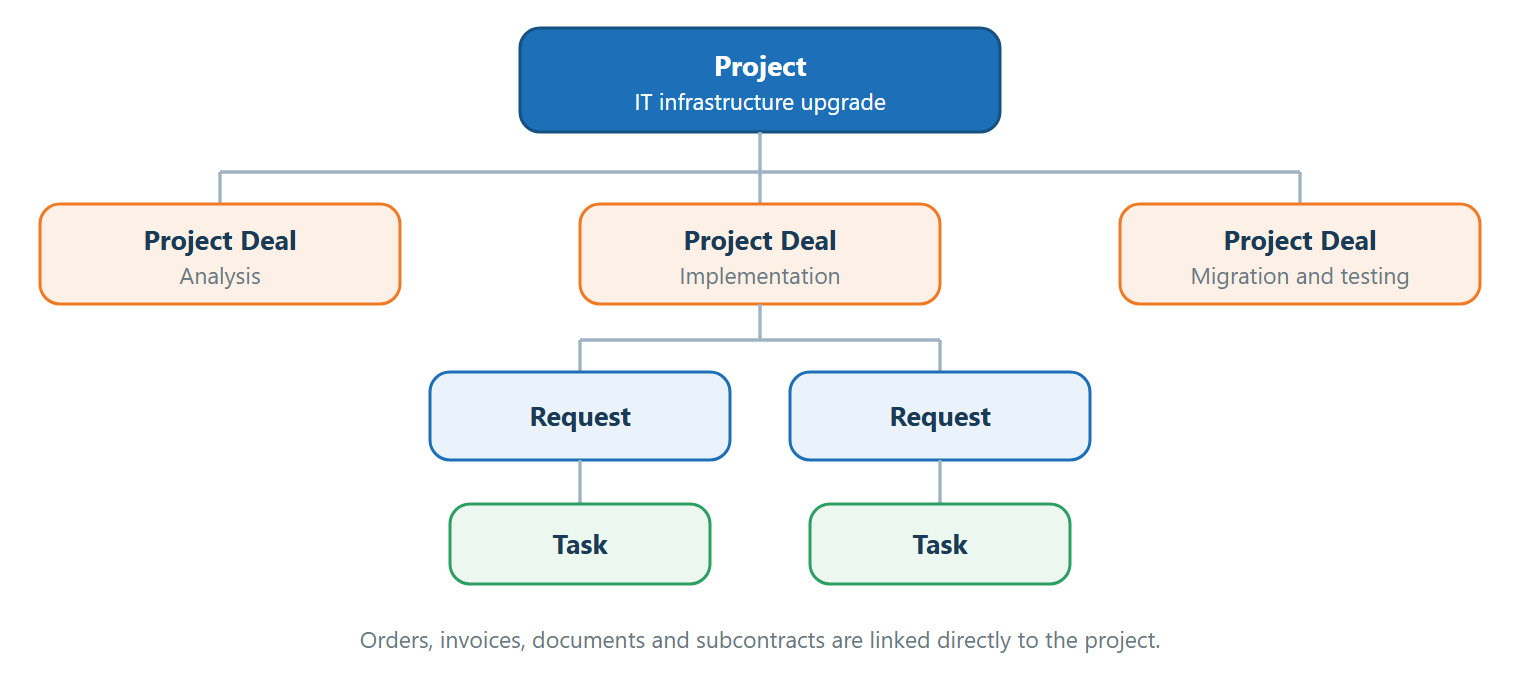
Requests and tasks are not linked directly to the project, but via the project deal to which they belong. Project deals, registered orders, registered invoices, documents from the document register and subcontracts can be linked directly to the project.
If a request or task is not included in the project contract, it will not appear on the ‘Requirements’ and ‘Project Tasks’ tabs, and its fulfilment will not be included in the project’s financials.
What the module enables
The module covers project planning, progress monitoring and financial management. The individual fields are described in detail in the following chapters of this section.
- Portfolio overview – the project list views all projects in one place, including their statuses, responsible persons, dates and financial indicators.
- Working with requirements and tasks – work on a project takes place within common requirements and tasks; therefore, notifications, SLAs and date escalations also apply to this work. Data does not need to be entered twice.
- Gantt chart timeline – the entire project is displayed on a single timeline, including dependencies between project orders, requests and tasks. An object shift can automatically shift subsequent dates.
- Completion status – the percentage complete can be calculated automatically from the bottom up, from tasks and requests to the project deal, and from project deals to the project.
- Project economics – hours worked are recorded as fulfilments where the work takes place. The financial view compares the plan with actual figures for revenue, expenses and gross margin.
- Reporting – each user can customise dashboards for projects and project deals using charts, metric cards and lists.
- Documentation and communication – a project log, project documentation, documents and a change history are maintained for each project.
Conditions of use
The module is enabled in the global settings. The ‘Projects’ level itself is optional – without it, only project deals can be used. A more detailed description is available in the ‘General Project Settings’ section of the documentation.
Working with project deals, their financial aspects and subcontracts is described in a separate section of the documentation entitled ‘Project Deals’.