


The financial view is used to track the project’s hours and costs. It compares planned and actual figures on an ongoing basis throughout the project, rather than only at the end.
Resources of economic indicators
The project does not have its own financial fields. Its financial indicators are the sum of the project deals directly linked to the project. The data is automatically fed into the project from the places where it is generated.
| Indicator | Plan | Actual |
|---|---|---|
| Revenue | Billing milestones for project orders as per the contract (the Revenue tab on the project order). Retention money as per the contract is also included. Milestones for which the Do not include in revenue plan box is ticked are not included. | Invoices issued in connection with project deals (without VAT). Prepayment invoices and payment receipt documents are not included. |
| Retention money | Retention money in accordance with the project deal quotation (the Retention money (quotation) section on the Revenue tab). | Invoiced retention money – items on issued invoices linked to retention money milestones (without VAT). |
| Expenses | External costs as per the contract for subcontracts under project orders. | Registered invoices linked to project contracts or their subcontracts (without VAT). |
| Gross margin | Planned revenue minus planned expenses. | Invoiced revenue minus real costs. |
| Fulfilments | Planned hours from the Work Planning section on the Balance and Planning tab. | Hours worked on project orders, their tasks and requirements, including child project orders and child requests. |
| Average hourly rate | Gross margin divided by the quantity of hours. This shows how much margin is generated by one hour of work. | |
The project has projected revenue of €50,000 and projected expenses of €20,000; the projected gross margin is therefore €30,000. With 600 hours planned, the projected average hourly rate works out at €50 per hour.
Hours worked are not entered separately for the project. They are recorded as fulfilments on the request or task where the work is carried out, and are automatically transferred to the project order and the project. Hours from a request are included in the project order if the ‘Include time in project order’ box is enabled on the request. Internal fulfilments are also included; leaves are not included. The hours are included in the ‘Fulfilments (hours)’ metric and in the average hourly rate; they are not included in expenses.
If the Count the time in project order box is not enabled on the project request, the hours spent on fulfilling it will not be displayed in the financial overview of either the project order or the project.
The indicators are recalculated automatically upon saving a performance report, a billing milestone, an invoice, a subcontract, a request, a project order or a project.
‘Economic Outlook’ tab
The ‘Economic Overview’ tab in the project details displays a table with the columns ‘Revenue’, ‘Retention money’, ‘Costs’, ‘Gross Margin’, ‘Fulfilments’ and ‘Average hourly rate’ in the ‘Plan’ and ‘Actual’ rows. Below this is the Summary section, showing the values for Planned Revenue, Invoiced Revenue (without VAT), Planned Costs and Real Costs (without VAT).
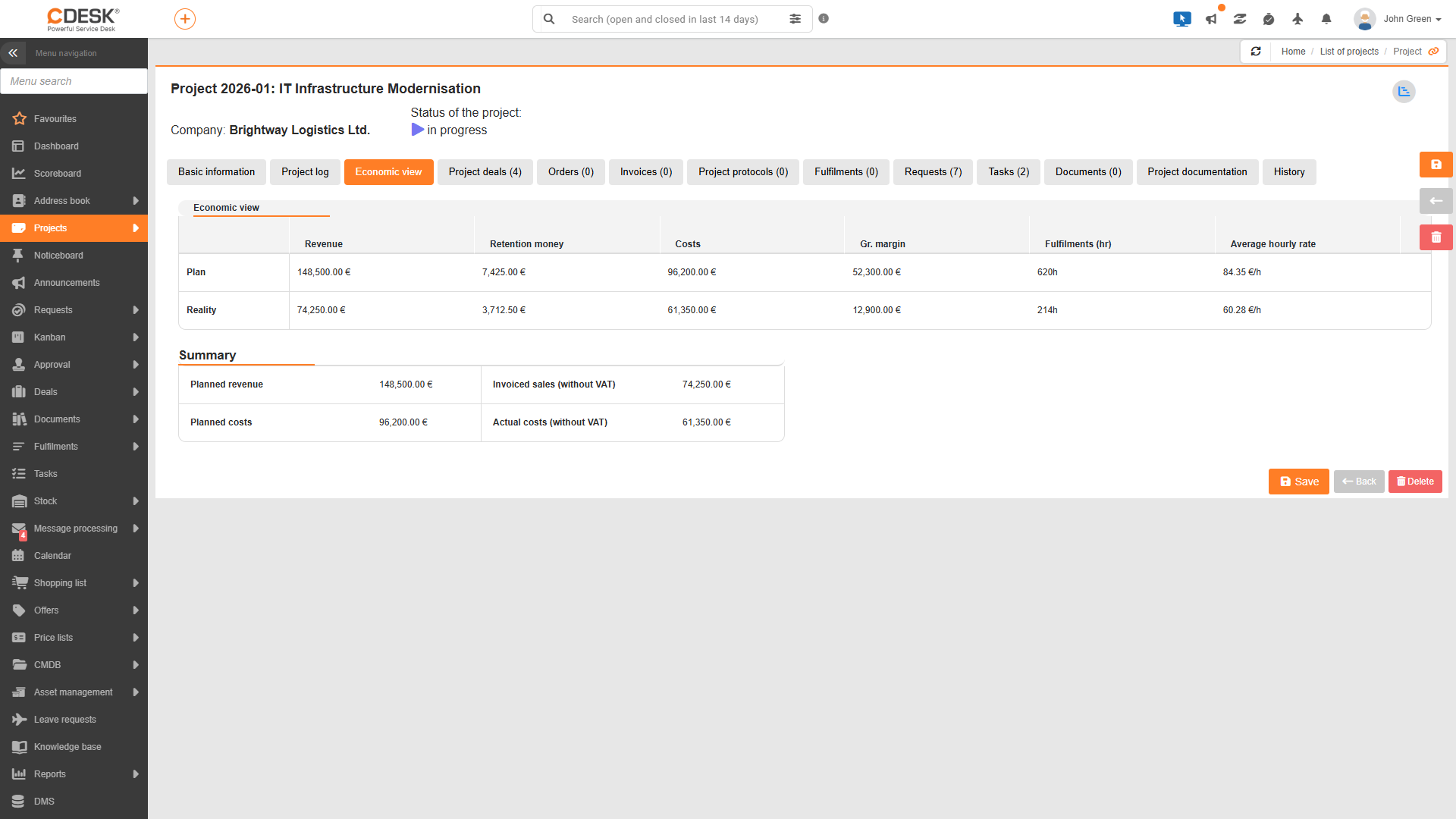
The tab is viewed by users with the Financial View permission in the Access to Tabs node. It is not viewed by project team members who are not project managers, or – in the case of an internal project – by users without access to internal projects.
An economic perspective in the list of projects
In the project list, you can switch to the Financial view and compare the financial performance of all projects at once. The columns show the planned, actual and remaining figures for revenue, costs and fulfilments; the planned and actual figures for retention money; and the gross margin according to the plan, actual figures and the offer. The planned values for revenue, costs and gross margin correspond to the contractual values of the project contracts; the planned value for retention corresponds to the quotation; and the quoted value for gross margin corresponds to the quotation. When a project is expanded, the financial data for its project deals are viewed.
Costs at the level of a project deal
The project order provides a detailed breakdown of the finances for each individual phase of the project. For example, the ‘Balance and Planning’ tab displays the gross margin as a percentage and the remaining amount available for usage of the gross margin. Work planning, billing milestones, subcontracts and invoices are entered in the project order. A more detailed description is available in the Project Orders documentation section.
Currencies
Amounts in a currency other than the default currency set in the ‘Currencies’ section on the ‘Global Settings → Accounting’ (Accounting Settings) page are converted into financial indicators using the exchange rates from the NBS exchange rates list. For the plan, the exchange rate to the date of the billing milestone is applied, and for actual figures, the exchange rate to the date the invoice was issued. If the exchange rate for the date has not yet been published, the latest available rate is applied. The conversion of items with a future date is automatically updated twice a day. The currency is not selected at the project level.