


Beta verzia novej dokumentácie.
Home Automation via API Automation via API Request and fulfilment of the call
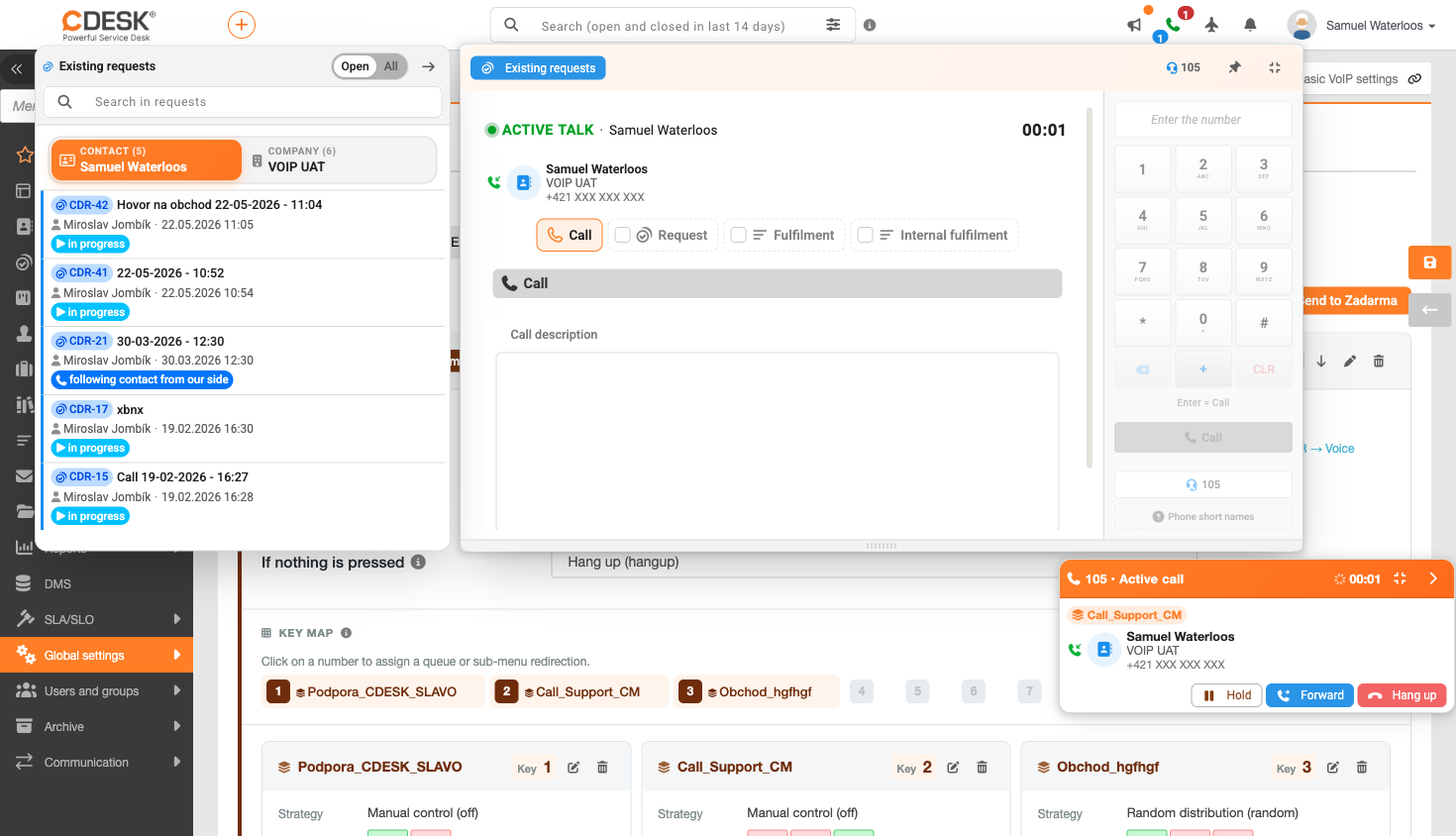
This is the main benefit of integration – the call is not lost, but remains recorded as a request or a fulfilled task. The procedure is as follows:
1. Answer the call. If call processing is enabled for the relevant queue or for outbound calls, a form displaying the call details will appear.
2. Check the pre-filled company name and request template. If changes are permitted, you can amend them whilst the call is still in progress.
3. In the ‘Tags’ section, select the predefined values. The selected tag will be transferred to the ‘Tags’ field on the request.
4. Save the call as a request, or attach a fulfilment or deal to it – depending on what is permitted for the relevant queue.
5. If the option to attach the recording and call details is enabled, these will be automatically attached to the request.
The field showing the request status will be pre-filled with the first available value if it is not specified by the template – the template always takes precedence. If you create both a request and a fulfilment at the same time, the fulfilment will be linked to the request you have just created. The form is not carried over between calls: when processing another call, a blank form opens, but your own custom draft for that call is correctly restored.
Home Automation via API Automation via API Request and fulfilment of the call
Na tejto stránke