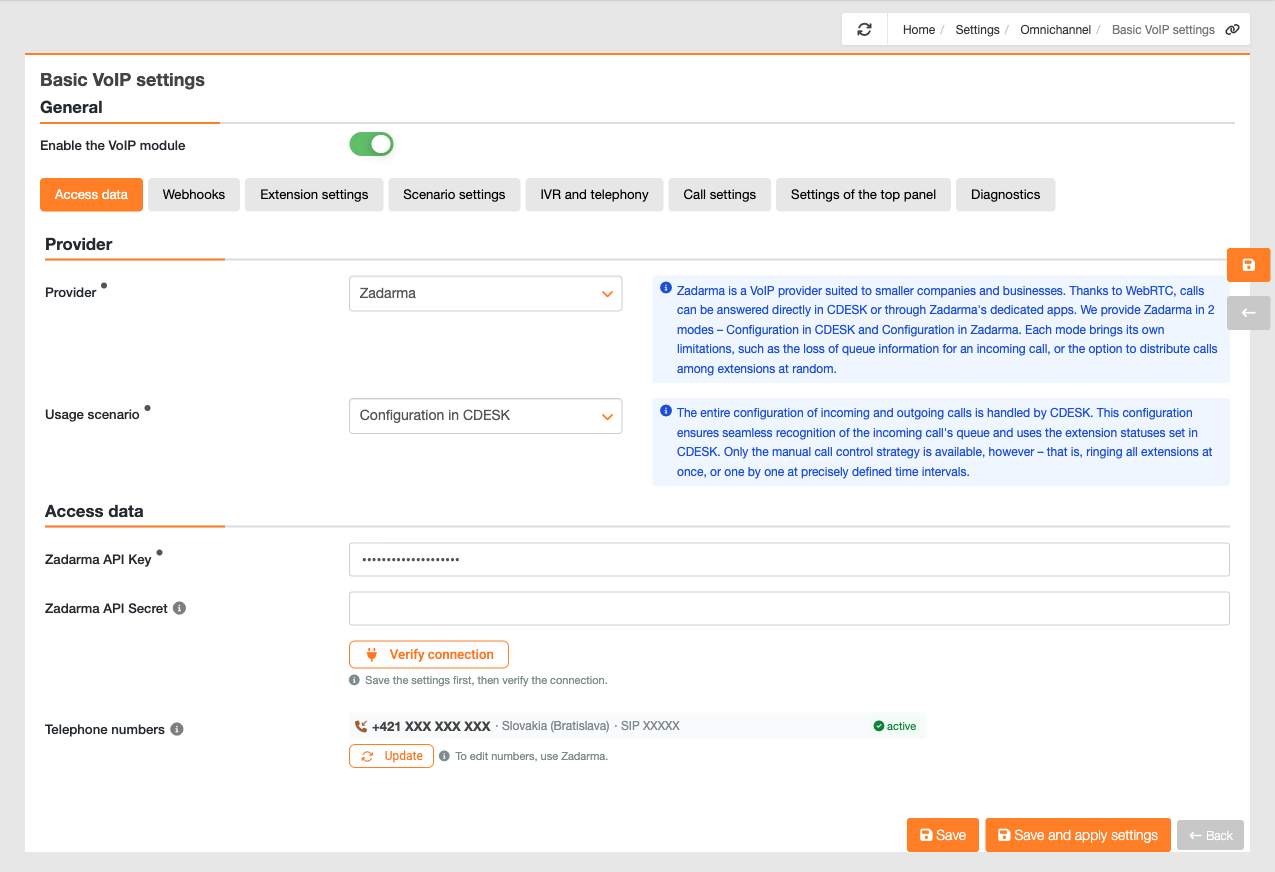


Zadarma can be applied in two ways, and this decision is the most important one when setting it up. It does not determine the appearance, but rather who decides where the call is routed – whether it is the Zadarma switchboard or CDESK. This then determines which functions are available and which are not.
The scenario is selected in the ‘Usage Scenario’ field, which is located below the provider selection in the ‘Access Data’ tab. It is only viewed for the Zadarma provider and offers two options – ‘Configuration in Zadarma’ and ‘Configuration in CDESK’.
Notice: When you switch scenarios, CDESK will view a warning detailing the consequences of the change. Saved prompts and the voice response system menu are not deleted – they are simply not applied in the ‘Zadarma Configuration’ scenario, so they will be available again once you switch back.
Configuration in Zadarma
Zadarma provides the entire configuration for incoming and outgoing calls. The limitations in this scenario are that incoming calls in CDESK are not queued and status synchronisation does not work. However, all call distribution strategies will be available to you.
In practice, this means that call routing is managed by the PBX according to its custom configuration. CDESK does not know which queue the call came from, as this information is lost in transit. Extension statuses set in CDESK, such as ‘Do Not Disturb’, are not carried over to the PBX, so they do not actually take effect. The ‘Scenario Settings’, ‘IVR’ and ‘Telephony’ tabs are hidden in this scenario – both the queues and the automated voice system are managed in the Zadarma portal.
As calls cannot be distinguished by queue, the handling of incoming calls is governed by a single global setting, ‘Handle incoming call by creating a request’, in the Call Settings tab, which applies to all calls, just as is the case with outgoing calls. The advantage of this scenario is that you have access to all the call distribution strategies offered by Zadarma.
CDESK does not intervene in the call at all in this scenario. Therefore, neither working time monitoring nor voicemail applies – both are configured in the Zadarma portal, as are queues and the voice menu.
Please note: The ringtone is played by the Zadarma widget, not CDESK. CDESK will only play a custom ringtone during a call from the queue, so a different sound in this scenario is not a fault.
Choose this scenario if you have already set up call routing in Zadarma and wish to retain it, or if you require advanced call distribution strategies and the queue records in CDESK are not essential.
Configuration in CDESK
The entire configuration of incoming and outgoing calls is managed by CDESK. This configuration provides the seamless recognition of incoming call sequences and utilises the selected extensions defined in CDESK. However, only a manual call routing strategy is available, i.e. ringing all extensions simultaneously or one at a time at precisely defined time intervals.
The call passes through the voice response system in CDESK, so CDESK recognises the queue to which the call has been routed and can process it accordingly. The extension statuses selected in CDESK are applied, so the ‘Do Not Disturb’ status is effectively applied and a red signal icon is displayed next to such an extension in the line. You configure the queues, the voice automated system, working time and the voicemail in CDESK.
A key benefit is that call handling is configured separately for each line. A call to the service queue can therefore generate a request using a different request template and a different default company than a call to the billing queue. In this scenario, the contact’s name is also viewed on the extension, precisely because the call passes through the CDESK automated voice system.
The trade-off is that the call distribution strategy is locked to manual control. The extensions ring according to a manually set delay and duration; you determine the order and timing.
If a queue previously had a different strategy, switching to this scenario will override it to manual, and the change will also be sent to Zadarma so that the settings remain the same on both sides.
Even in this scenario, a call may come in where no queue is specified – for example, if a queue has not been assigned a name in CDESK or if the key pressed is not mapped to any queue. In such cases, the call is handled according to the global settings ‘Handle incoming calls by creating a request’, just as in the ‘Configuration in Zadarma’ scenario.
Limitation: When using the manual strategy, the switchboard has its own limitation – if at least one extension in the line is unreachable, the call will ring only on the first available extension and will not be forwarded any further. This is dealt with separately.
Select this scenario if you wish to have calls recorded and managed via CDESK – queues by department, operator statuses and call handling on request by queue.
Comparison of scenarios
To help you make a quick decision, below is a summary of the key differences.
| Configuration in Zadarma | Configuration in CDESK |
Who controls call routing | Zadarma switchboard | CDESK via an automated voice system |
Recognition of the incoming call queue number | No | Yes |
Extension statuses selected in CDESK | not applied | applies |
Call distribution strategies | all those offered by Zadarma | manual control only |
Queue settings and IVR settings | in the Zadarma portal | in CDESK |
Handling of incoming calls | one global setting | separately for each queue, globally for an unspecified queue |
Notice: These two options cannot be combined. There is no solution available that would support all distribution strategies whilst also enabling sequence recognition in CDESK – this is precisely the crux of the difference. Changing the scenario after deployment means reconfiguring the routing on the side that takes it over.